Adding Runtime Memory to Hermes Agent as a memory provider
Contents6
This is Part 4 of a series on building AI memory that learns. Part 3 covered connecting one memory store to several agents. This post adds it to Hermes Agent.
Running Hermes Agent from a script
Hermes Agent is an open-source AI agent from Nous Research. It runs in three ways:
- Most people use it interactively, in a terminal or through a chat app.
- The
-zmode runs it as a scripted one-shot. It takes one prompt, prints the final answer and exits. The CLI reference lists shell scripts, CI, cron jobs and parent processes as its intended callers. - An orchestrator can drive it. In Gladiator, Paperclip ran
hermes chat -q "<prompt>" -Qfor each agent’s next task and resumed that agent’s previous session.
I use Hermes as a scripted coding agent. A program starts it with one task, the agent does the work and the process exits:
hermes -z "<prompt>"
I wanted what the agent works out in one run, such as a project rule or the test command, to still be there in the next run. Hermes has built-in memory, but it saved nothing in these one-shot runs. Across 27 runs, MEMORY.md was never created.
Why Hermes saved nothing
Hermes keeps long-term notes in ~/.hermes/memories/MEMORY.md, capped at 2,200 characters by default. The memory docs say the file is loaded into the system prompt when a session starts. Notes get into it in two ways:
- The model can call the
memorytool during a task when it decides something is worth keeping. - Hermes can also run a background review after a reply, where a separate model call reads the conversation and saves anything useful. In the Hermes source, that review is due every
memory.nudge_intervaluser turns (10 by default).
A one-shot run has a single user turn, so the review never comes due. Hermes also has a skills review that’s triggered by tool-call count, but both reviews run in a background thread and a one-shot run exits without waiting for them.
That leaves the model calling the memory tool itself. In my 27 one-shot runs with Hermes’ default memory, all on deepseek-v4-pro, it never did. Hermes recorded no completed background review either, so every run started with empty memory.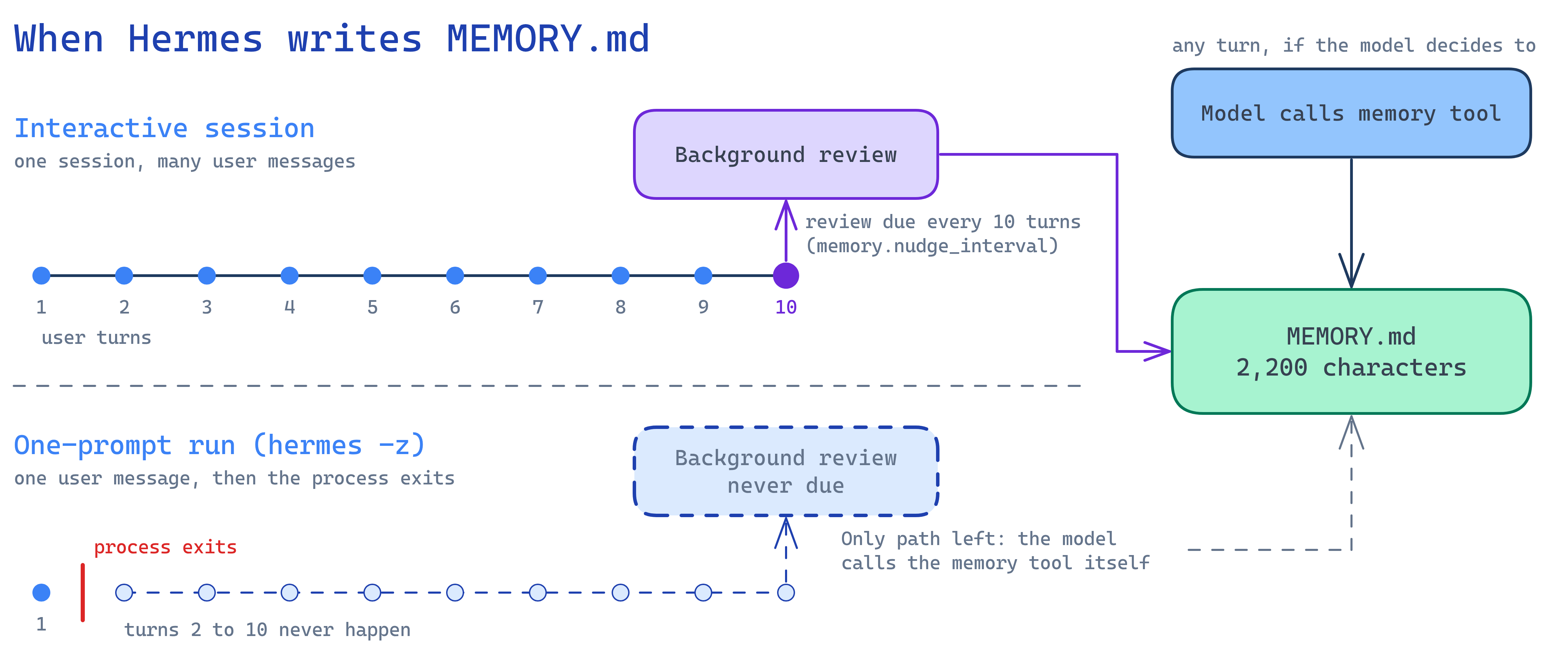
This mostly affects one-shot runs. An interactive session with enough turns reaches the review regularly. Hermes issue #109375 describes the same problem in other short-lived runtimes. As of October 2026 it’s still open. Pull request #129551 would make one-shot runs finish the review before they exit.
Adding Runtime Memory as a memory provider
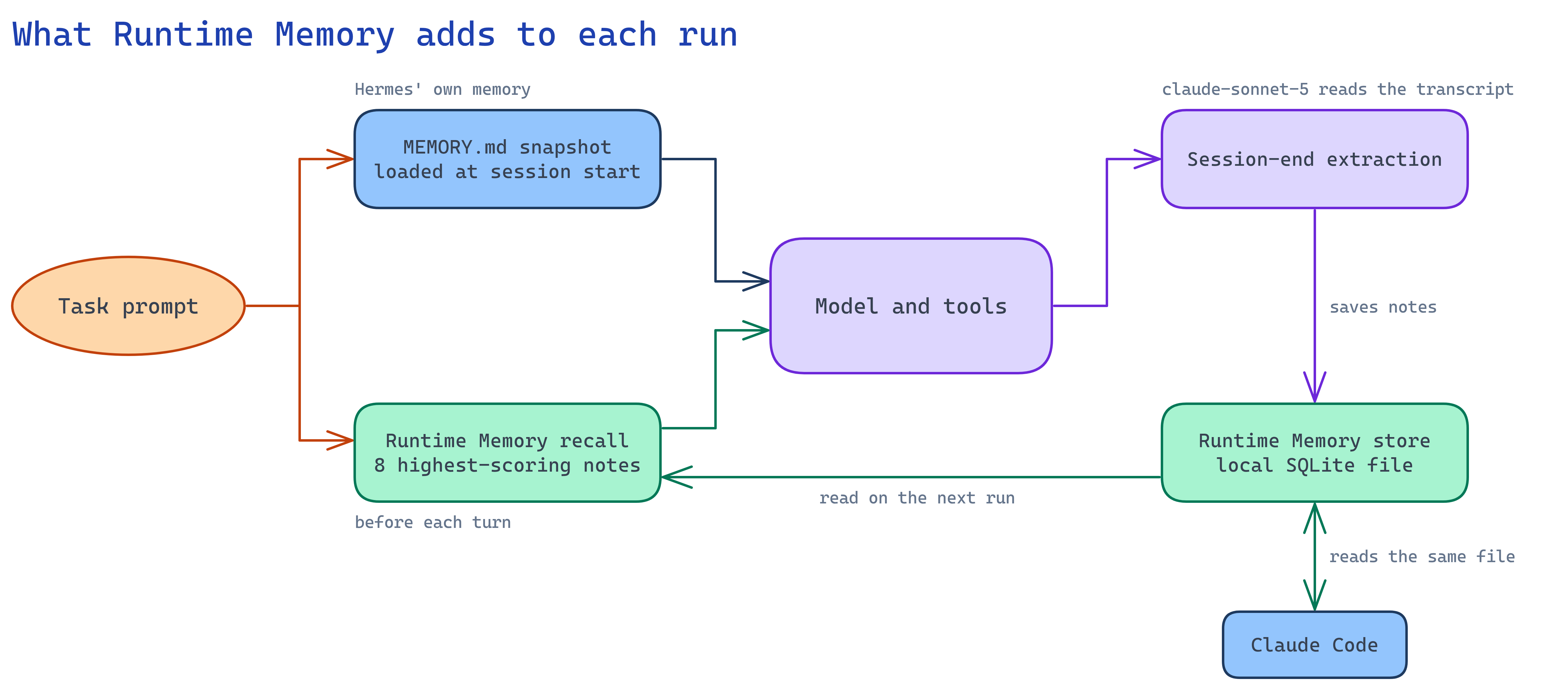
Hermes can use one external memory provider alongside MEMORY.md. It calls the provider before each turn, after each turn and when the session ends. The session-end call runs before a one-shot run exits, so a provider can save notes from a one-shot run where Hermes’ own review can’t.
Mem0, Hindsight and Honcho are among the existing providers. I used Runtime Memory, the store I described in Part 2. It was called Memory Layer when I wrote the earlier parts. It keeps notes in a local SQLite database that Claude Code also reads through a plugin, so Hermes and Claude Code share what they learn about the same repositories. During a Hermes run, Runtime Memory works like this:
- When a Hermes session ends, Runtime Memory sends the transcript to a Claude model, which writes short notes such as a project rule or where a tool is installed. This step is called extraction.
- Before each turn, Runtime Memory searches its notes using the user’s message and adds the eight best matches to the prompt. The ranking combines how well a note matches with other signals, including whether the note helped in earlier tasks.
Setup is five lines. The first installs the package into Hermes’ own Python environment. The last makes Claude Haiku 5.5 write the notes instead of the default, Claude Sonnet 5. That setting needs Runtime Memory 4.0.1 or later:
~/.hermes/hermes-agent/venv/bin/python -m pip install 'runtime-memory[embedding,extraction]'
hermes config set memory.provider runtimememory
export RUNTIME_MEMORY_EXTRACT_ON_END=true                 # session-end extraction is off by default
export ANTHROPIC_API_KEY=...                              # extraction uses Claude
export RUNTIME_MEMORY_EXTRACTION_MODEL=claude-haiku-5-5   # the default is claude-sonnet-5
The other settings are in the Hermes guide.
Semantic search didn’t work in these runs. Its embedding model took about 15 seconds to load on my machine and Hermes waits at most 8 seconds for a provider’s search, so Runtime Memory matched notes by keyword until the model was ready. A one-shot run never gets a second turn, so every run in my test used keyword search.
Testing it
I built a small Python ledger project with seven house rules, such as money amounts being Decimal and never float. One rule needs a policy code from a register of twelve, where only one audit code is in force. The rules are checked by a shared test file, tests/rules.py, which the agent could read like any other file in the project.
I wrote nine coding tasks and ran each one as its own hermes -z run on deepseek-v4-pro, with a budget of 15 turns. I ran the nine tasks three times with Hermes’ default memory and three times with Runtime Memory 4.0.1. Each sequence started with empty memory. Nothing in the prompts told the agent to save what it learned. Runtime Memory used Claude Haiku 5.5 to write its notes. To keep the agent away from my test code, I ran it in a sandbox that could only see its own project.
This was my second run of the test. The first, in September, ran without the sandbox and used Claude Sonnet 5 to write the notes. In four of those runs the agent opened files outside its project. Two of them included my reference solution.
Results
Notes saved between runs
With Hermes’ default memory, none of the 27 runs saved anything. MEMORY.md was never created. With Runtime Memory, every run ended with an extraction call that saved notes. The three sequences saved 103 notes between them. Before each later task, Runtime Memory added the eight best-matching notes to the prompt.
The September run looked the same. Default memory saved nothing in 27 runs. Runtime Memory saved notes after 25 of its 27 runs.
These are two of the notes Haiku 5.5 wrote:
Environment gotcha: the system python3 and the hermes agent venv do not have pytest
installed, and `pytest` is not on PATH. Running `python3 -m venv .venv &&
.venv/bin/python -m pip install -q pytest` inside the workspace and then
`.venv/bin/python -m pytest -v` works without writing outside the workspace.
Mutating operations in the ledger package must write an audit row whose reason field
is exactly the string 'LEDGER-AUDIT-7'. This is the only audit policy in force per
docs/POLICY.md.
All 54 tasks passed and no run broke a house rule.
Model calls
From the second task on, the agent made fewer model calls with Runtime Memory:
| Model calls on tasks 2 to 9 | Default memory | With Runtime Memory |
|---|---|---|
| October, median sequence | 81 | 68 |
| October, each sequence | 78, 81, 88 | 77, 58, 68 |
| September, median sequence | 84 | 56 |
That’s about a sixth fewer calls in October and a third fewer in September. Task 1 took about the same number of calls in both setups, because the store starts empty.
Where the saved calls came from
The saved calls came from getting pytest to run. My test setup gave Hermes its own home directory, so the pytest installed under my user account wasn’t on the agent’s path and this failed:
$ python3 -m pytest
No module named pytest
The agent then had to find another way, such as building a virtualenv or installing pytest into a scratch folder. I counted the calls from a task’s first failed attempt to start pytest to its first passing test run:
| Getting pytest to run, tasks 2 to 9 | Default memory | With Runtime Memory |
|---|---|---|
| October | 12 tasks, 68 calls | 5 tasks, 24 calls |
| September | 13 tasks, 109 calls | 8 tasks, 22 calls |
In October, all the other calls added up to 179 in both setups, so the pytest note accounts for the whole difference. September saved more because the agent without memory took about eight calls to get past the problem each time. In October it took about six.
The project rules didn’t carry over the same way. Later tasks in both setups still opened the rules file and the policy register. The rules are written down in the project, so the agent read them whether or not it had notes about them.
In October, Runtime Memory didn’t make the agent faster. Its median time per task was 74 seconds, compared with 67 seconds with default memory. In September, the agent with Runtime Memory was faster, at 49 seconds per task compared with 84.
What the notes cost
Writing the notes adds a model call after every run. In October these calls cost $0.097 for the 27 runs. The agent model calls they saved were worth $0.057:
| October, 27 tasks | Default memory | With Runtime Memory |
|---|---|---|
Agent model, deepseek-v4-pro | $0.752 | $0.695 |
| Writing the notes, Haiku 5.5 | none | $0.097 |
| Total | $0.752 | $0.792 |
At DeepSeek prices, the notes cost slightly more than they saved. The cost of writing notes depends on the length of the transcript and stays the same whichever agent model you use. The calls that the notes save cost more with a pricier agent model. With these numbers, memory starts to pay for itself when the agent model costs about 1.7 times as much as deepseek-v4-pro.
Claude Sonnet 5 costs about 17 times as much as Haiku 5.5 for this job. I replayed the 27 September runs through Runtime Memory 4.0 with both models. Writing the notes cost $1.66 with Sonnet 5 and $0.10 with Haiku 5.5.
Hermes waits for the notes to be written before it exits. In Runtime Memory 4.0.1 this is a single call, which took a median of 15 seconds with Haiku 5.5. The version I ran in September made several calls and took 75 to 80 seconds.
Summary
Hermes’ built-in memory saved nothing in my one-shot runs. With Runtime Memory as a memory provider, every run saved notes. Each later task started with the eight notes that matched it best.
In my test project, the notes saved work in one place, getting the tests to run. That cut model calls by about a sixth in October and a third in September. The project’s rules were written down in its files, so the agent read them with or without memory.
With Claude Haiku 5.5 writing the notes, memory costs about as much as it saves with a cheap agent model like deepseek-v4-pro. With a pricier agent model, it saves money.
Next, I want to test Runtime Memory on a project where more of what the agent needs isn’t written down, which should show a larger difference. I also want to try interactive Hermes sessions, a lower memory.nudge_interval, other providers such as Mem0 and Hindsight and a pricier agent model.
Runtime Memory is at runtimenoteslabs/memory-layer and on PyPI as runtime-memory.
Series navigation:
 Related projectMemory Layer · active→