You’ve decided to use multiple payment processors. Maybe you want redundancy. Maybe you’re chasing better auth rates in specific corridors. Maybe you’re tired of being locked into one vendor’s pricing.
Whatever the reason, you now have a new problem: something needs to sit between your checkout and these processors. Something that decides which processor handles each transaction, stores card credentials safely, retries failures intelligently and reconciles everything at month-end.
That something is an orchestration layer. This is how to build one.
This covers inbound payments (customer pays you). Payout orchestration - virtual cards, supplier payments - works similarly but flows the other way.
TL;DR
- Under $50M/year: use a commercial platform, don’t build
- $50-150M: open-source (Hyperswitch) if you can operate it
- $150M+: own routing and reconciliation, buy everything else
- Never build your own vault
- Routing priority: compliance first, then auth rates, then cost
The core problem
When you have one processor, life is simple. Card goes in, result comes out. Add a second processor and suddenly you need answers to questions you never asked before:
- Where do you store the card so both processors can use it?
- How do you decide which processor gets which transaction?
- What happens when the primary processor times out mid-checkout?
- How do you reconcile settlements when money flows through multiple pipes?
- What does “multi-processor” mean for downstream finance workflows: refunds, disputes and chargebacks?
These aren’t edge cases. They’re the daily reality of multi-processor setups. Get them wrong and you’ll double-charge customers, lose transactions during outages or spend weekends reconciling spreadsheets.
Architecture
Here’s what you’re building:
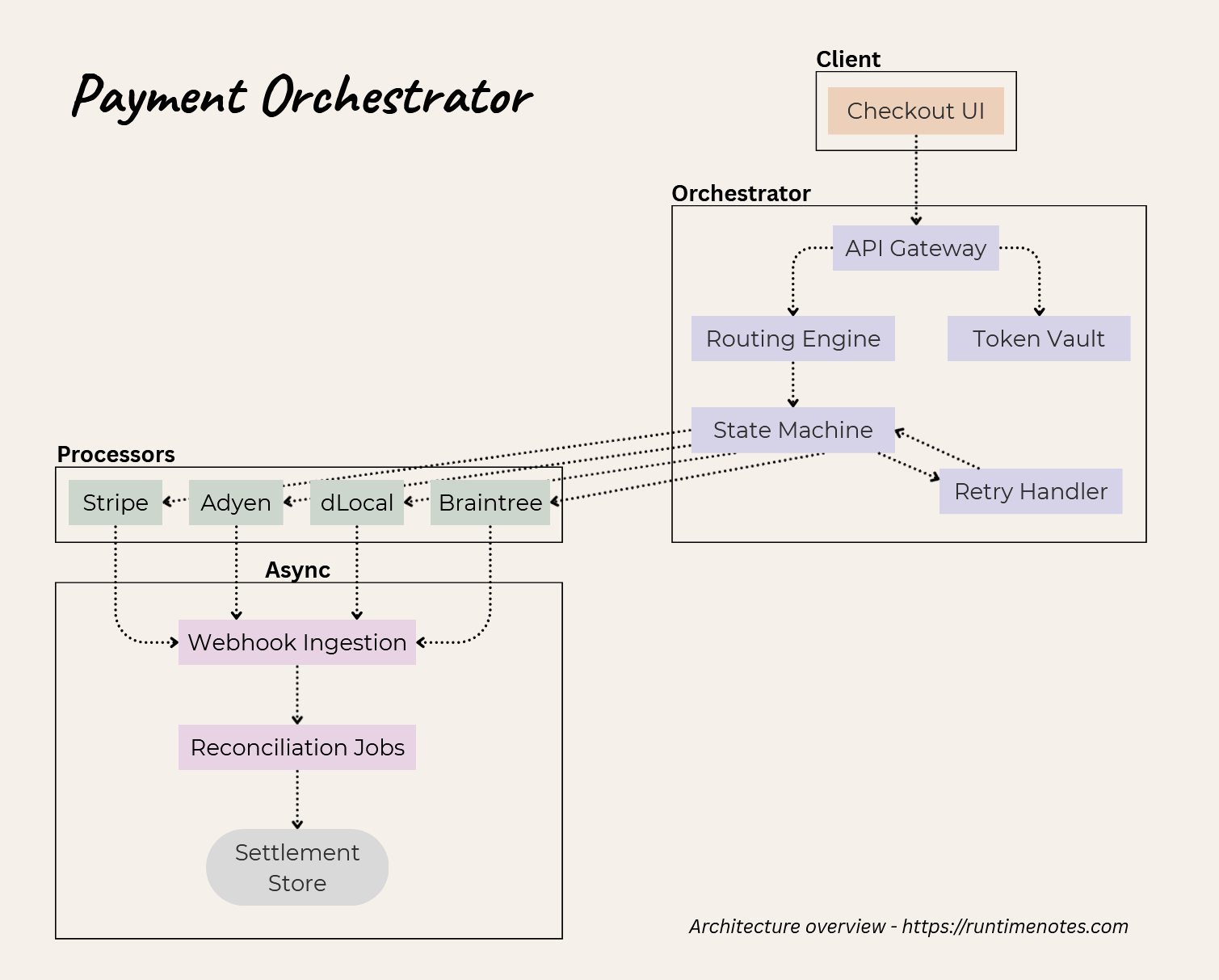
Six components, each with its own complexity:
| Component | What it does | Why it’s hard |
|---|---|---|
| Token Vault | Stores card numbers, returns tokens usable across processors | PCI scope. If you touch PANs, compliance costs $50-200K/year. |
| Routing Engine | Picks which processor handles each transaction | Rules seem simple until you have 50 of them fighting each other. |
| State Machine | Tracks auth→capture→refund lifecycle | Timeouts and retries create weird states. Idempotency is everything. |
| Retry Handler | Decides if a decline is worth retrying elsewhere | Wrong decision = lost sale or wasted processor fees. |
| Webhook Ingestion | Receives async updates from processors | Every processor sends different formats. Some send duplicates. |
| Reconciliation | Matches settlements to transactions | Timing gaps, currency mismatches, fee variations. Finance will hate you. |
You don’t have to build all of these yourself. In fact, you probably shouldn’t. The real question is: which pieces are worth owning?
The build-or-buy decision
There are three paths:
Use a commercial platform. Hosted orchestration. You pay per-transaction fees but avoid building anything. Makes sense under $50M/year when engineering time costs more than the fees. e.g. Spreedly, Primer, PayU Hub (formerly Zooz)
Run open-source. Self-hosted orchestration can make sense when fees start to dominate, but only if you’re prepared to operate connectors, monitoring and reconciliation. Sweet spot is $50-150M/year where fees add up but you don’t need deep customization. e.g. Hyperswitch (by Juspay). Rust-based, 50+ processor connectors, built-in vault. Battle-tested at scale in India.
Build custom. Write your own routing logic, state machine and reconciliation. This is $150M+ territory where routing decisions are competitive advantage. e.g. third-party vaults (Basis Theory, VGS, Skyflow) or adapter libraries (ActiveMerchant) for the commodity pieces.
Most teams overestimate how custom they need to be. Your routing rules probably aren’t that special. Your reconciliation definitely isn’t. Build what differentiates you, buy the rest.
One rule applies everywhere: avoid building your own vault. The PCI compliance burden alone costs $50-200K annually, plus you carry the liability. Use network tokens or a certified third-party vault. Always.
Now let’s go through each component.
Token vault
You need somewhere to store card credentials that works across processors. This is the foundation: get it wrong and you’re either locked into one processor’s token format or you’ve quietly expanded your PCI scope into a never-ending compliance project.
A vault should:
- Collect card data safely (ideally without your servers ever handling raw PAN)
- Store it inside a PCI-compliant boundary
- Return a stable token you can keep in your database
- Release credentials to downstream processors on demand (or provide a network token)
Tokenization types
flowchart TB
    subgraph Input
        pan[PAN: 4111111111111111]
    end

    subgraph Methods
        fpe[Format Preserving<br/>4111110012349876]
        random[Random Token<br/>tok_a8f3b2c1d4e5]
        network[Network Token<br/>4895120014339012<br/>+ Cryptogram]
    end

    pan --> fpe
    pan --> random
    pan --> network
| Type | Format | Portability | Updates | Use case |
|---|---|---|---|---|
| Format-preserving | Looks like PAN | Vault-dependent | Manual | Legacy systems / strict validation |
| Random | Opaque token | Vault-dependent | Manual | Most modern vaults |
| Network token | Token PAN + cryptogram | High | Automatic | Best long-term default |
Format-preserving encryption (FPE). The token looks like a card number - same length, passes Luhn check. Systems that validate card formats keep working. Downside: tokens are deterministic, so the same card always produces the same token. Good for deduplication but you lose the security benefit of random tokens.
Random tokens. Most vaults use random strings with a lookup table. More secure (no way to reverse-engineer the original PAN) but requires the vault in the transaction path for every charge.
Network tokens (Visa VTS, Mastercard MDES). The most future-proof: they’re designed to work across processors, get refreshed automatically when cards expire or are reissued and tend to perform better on recurring transactions. The tradeoff is complexity: you need cryptograms per transaction and a clean fallback story for cards that don’t support tokenization.
Network token provisioning flow
sequenceDiagram
    participant M as Merchant
    participant V as Vault/TSP
    participant N as Card Network
    participant I as Issuer

    M->>V: Store card (PAN, exp, name)
    V->>N: Request network token
    N->>I: Validate card, request token
    I->>N: Approve, return token
    N->>V: Network token + TRID
    V->>M: Vault token (references network token)

    Note over M,I: On transaction:
    M->>V: Authorize with vault token
    V->>N: Request cryptogram
    N->>V: Dynamic cryptogram
    V->>Processor: Network token + cryptogram
    Processor->>I: Authorize
Key insight: Network tokens reduce “silent churn” on recurring payments because lifecycle events (expiry/reissue) are handled upstream and propagated automatically, instead of forcing customers to re-enter card details.
Vault patterns you’ll actually see in production
There are three common implementation patterns. The choice is less about “best vendor” and more about where you want dependency and blast radius to live.
1. Orchestration-led vault (vault + distribution) The cleanest mental model for multi-processor systems: store once, route anywhere. Vendors like Spreedly fit here and commercial orchestration platforms (e.g. Primer) often bundle vaulting + tokenization primitives alongside routing.
2. PSP-led vault + forwarding (fastest path to multi-processor without migrating cards) If you’re anchored on a primary PSP/processor, vault + forwarding can act as a bridge: you keep stored credentials where they are and forward to a second PSP/processor when needed. Examples include: Stripe Vault + Forward, Checkout.com Vault + Forward API, Adyen forwarding. This pattern trades some long-term portability for speed and reduced migration work.
3. Merchant-owned / privacy vault (tokenize once, keep processors interchangeable) This pattern puts tokenization under a vendor you treat as infrastructure (not your acquirer). Tools like Basis Theory, VGS and Skyflow are often used this way, especially when you want broader sensitive-data handling beyond cards.
Third-party vault options
| Provider | Token types | Network tokens | Forwarding / distribution | Best fit |
|---|---|---|---|---|
| Spreedly | Random | Yes (via partners) | Yes (vault + distribute to processors) | Multi-processor portability by design |
| Basis Theory | FPE / Random | Yes (via partners) | Yes (workflow + integrations) | “Merchant-owned” vault layer |
| VGS (Very Good Security) | FPE | Via partners | Yes (proxy-style vault + routes) | Privacy-vault approach, broader sensitive data |
| Skyflow | FPE / Random | Yes (via partners) | Yes (via integrations) | Privacy vault + regulated environments |
| Stripe Vault + Forward | Stripe tokens | Limited | Forwarding to supported endpoints | PSP-anchored, quickest second-processor bridge |
| Checkout.com Vault + Forward | Vault tokens + network token details | Yes | Forwarding to PCI-compliant third parties | PSP-anchored bridge with strong forwarding model |
| Adyen (forwarding) | Adyen token / network tokens | Yes | Forwarding to PCI-compliant third parties | Adyen-anchored portability / forwarding |
PCI scope implications
| Approach | PCI SAQ level | Annual cost | What changes |
|---|---|---|---|
| Your own vault | SAQ D (full) | $50-200K | You own storage, encryption, key mgmt, access controls, audit burden |
| Third-party vault (hosted fields / iframe / redirect) | SAQ A / SAQ A-EP | $5-20K | You avoid storing PAN and narrow what your systems touch |
| Network tokens only | SAQ A | $2-5K | You keep raw PAN out of your environment and reduce lifecycle ops |
The practical takeaway: the vault is not where you want to “learn compliance.” Even if you can build it, operating it is the expensive part.
Recommended approach
- Start by not owning PAN. Use a third-party vault with hosted fields/iframe so raw card data never touches your servers.
- In early versions, optimize for portability and speed of adding processors, not theoretical perfection.
1. Phase 1 (get multi-processor working): Use a vault that can distribute/forward credentials to multiple processors so you store once and route anywhere. Keep your internal model token-provider-agnostic (provider + token + metadata) and treat processors as interchangeable adapters.
2. Phase 2 (reduce churn and lift auth rates): Introduce network tokens for recurring and high-value segments. This is where you get the biggest operational win (less expiry churn) and often better issuer acceptance, but only after your orchestration is stable.
3. Phase 3 (de-risk lock-in): If you started anchored on a PSP, keep forwarding as a bridge, then migrate your long-lived payment methods into a PSP-agnostic vault once routing and reconciliation are stable.
One hard rule: don’t build your own vault unless payments security/compliance is a core competency and you’re prepared to run a full-time PCI program.
Routing engine
The router decides which processor handles each transaction. Simple in theory. In practice, you’re juggling cost optimization, auth rates, feature requirements and reliability - often in conflict with each other.
Decision flow
flowchart TD
  A[Transaction Request] --> B[BIN / Card Metadata Lookup]

  B --> C{High-risk / restricted MCC?}
  C -->|Yes| HR[High-Risk / Specialized Processor] --> AUTH1[Authorize] --> OUT1[Return Result]

  C -->|No| D{Corporate / Commercial card?}
  D -->|Yes| L23[L2/L3-Capable Processor] --> AUTH2[Authorize] --> OUT2[Return Result]

  D -->|No| E{Local acquiring available?}
  E -->|Yes| LACQ[Route to Local Acquirer] --> GEO{Geography?}
  E -->|No| F{Debit card?}

  F -->|Yes| DEB[Debit-Optimized Processor] --> GEO
  F -->|No| DEF[Default / Cheapest Processor] --> GEO

  GEO -->|Brazil| BR[dLocal - Local Acquiring]
  GEO -->|India| IN[Primary Card Processor]
  GEO -->|Europe| EU{Amount < 100 EUR?}
  GEO -->|US| US{MCC exception?}
  GEO -->|Other| COST[Lowest Cost Available]

  EU -->|Yes| EU1[Adyen - Best Small Txn Rate]
  EU -->|No| EU2[Stripe - Volume Discount]

  US -->|5967 Direct Marketing| HR2[High-Risk Processor]
  US -->|Other| COST

  IN --> UPI{UPI fallback eligible?}
  UPI -->|Yes| IN2[Razorpay - UPI Fallback]
  UPI -->|No| IN3[Continue Card Rails]

  BR --> AUTH3[Authorize] --> OUT3[Return Result]
  EU1 --> AUTH3
  EU2 --> AUTH3
  HR2 --> AUTH3
  IN2 --> AUTH3
  IN3 --> AUTH3
  COST --> AUTH3
The order matters. High-risk or restricted MCCs get checked first because they require specialized processing regardless of cost. Corporate cards come next because L2/L3 capability is a hard constraint. Local acquiring follows because auth rate improvements usually outweigh small cost differences. Only after those constraints are satisfied do you fall back to cost optimization.
BIN-based routing
BIN (Bank Identification Number) data tells you the card’s issuing bank, country, funding source and product type. This drives most routing decisions:
| BIN attribute | What it tells you | Routing implication |
|---|---|---|
| Funding source | Debit vs credit vs prepaid | Debit has regulated interchange, route for cost. Prepaid has higher fraud risk. |
| Issuer country | Where card was issued | Local acquiring wins 5-15% on auth rates. Brazil card to dLocal, India to local processor. |
| Product type | Consumer vs corporate | Corporate needs L2/L3 data support or you lose interchange optimization. |
| Card brand | Visa/MC/Amex/Discover | Amex has different economics. Some processors have better rates on specific brands. |
BIN data isn’t free. Providers like Parrot, Binlist or the card networks charge for accurate, up-to-date lookups. Budget $5-20K/year depending on volume.
MCC-based routing
Merchant Category Codes determine risk profile and which processors will even accept the transaction:
| MCC | Category | Routing consideration |
|---|---|---|
| 5967 | Direct marketing | High chargeback risk - needs processor with strong dispute tools |
| 7995 | Gambling | Restricted category - specialized processors only |
| 5411 | Grocery | Low margin - route to lowest-rate processor |
| 4722 | Travel agencies | Auth-capture gap - needs processor supporting long holds |
| 5816 | Digital goods | High fraud risk - route to processor with strong fraud scoring |
When rules conflict
Example: a Brazilian corporate card buying gambling services. Which rule wins? You need explicit priority:
- Restricted MCC (legal/compliance requirement)
- Corporate card (functional requirement)
- Local acquiring (performance optimization)
- Cost optimization (margin improvement)
Some teams add ML to optimize dynamically. Most don’t need it - a well-tuned rules engine with clear priorities handles 95% of cases. Build this yourself only if routing is genuinely a differentiator.
3DS and SCA
EU cards require Strong Customer Authentication under PSD2. Most transactions need a 3DS challenge unless you request an exemption.
Exemptions: low-value (under €30, but issuers track cumulative), recurring after the first authenticated payment, and Transaction Risk Analysis (TRA) where the processor’s fraud rate qualifies. TRA matters for routing. A processor with a clean fraud book gets exemptions up to €500. One with problems might not qualify at all.
Cascading breaks down here. Once a customer completes 3DS with Processor A, that authentication is bound to that merchant ID. You can’t hand it to Processor B. If your primary declines after 3DS, you either fail the transaction or ask the customer to authenticate again. Neither works. Primary routing matters more in 3DS flows because you don’t get retries.
Liability adds another angle. Successful 3DS shifts fraud chargebacks to the issuer. Exempted transactions keep liability with you. In high-risk corridors you might force 3DS even when exemptions are available, trading conversion for chargeback protection.
Cascade retry logic
When a transaction fails, should you try another processor?
Depends on why it failed:
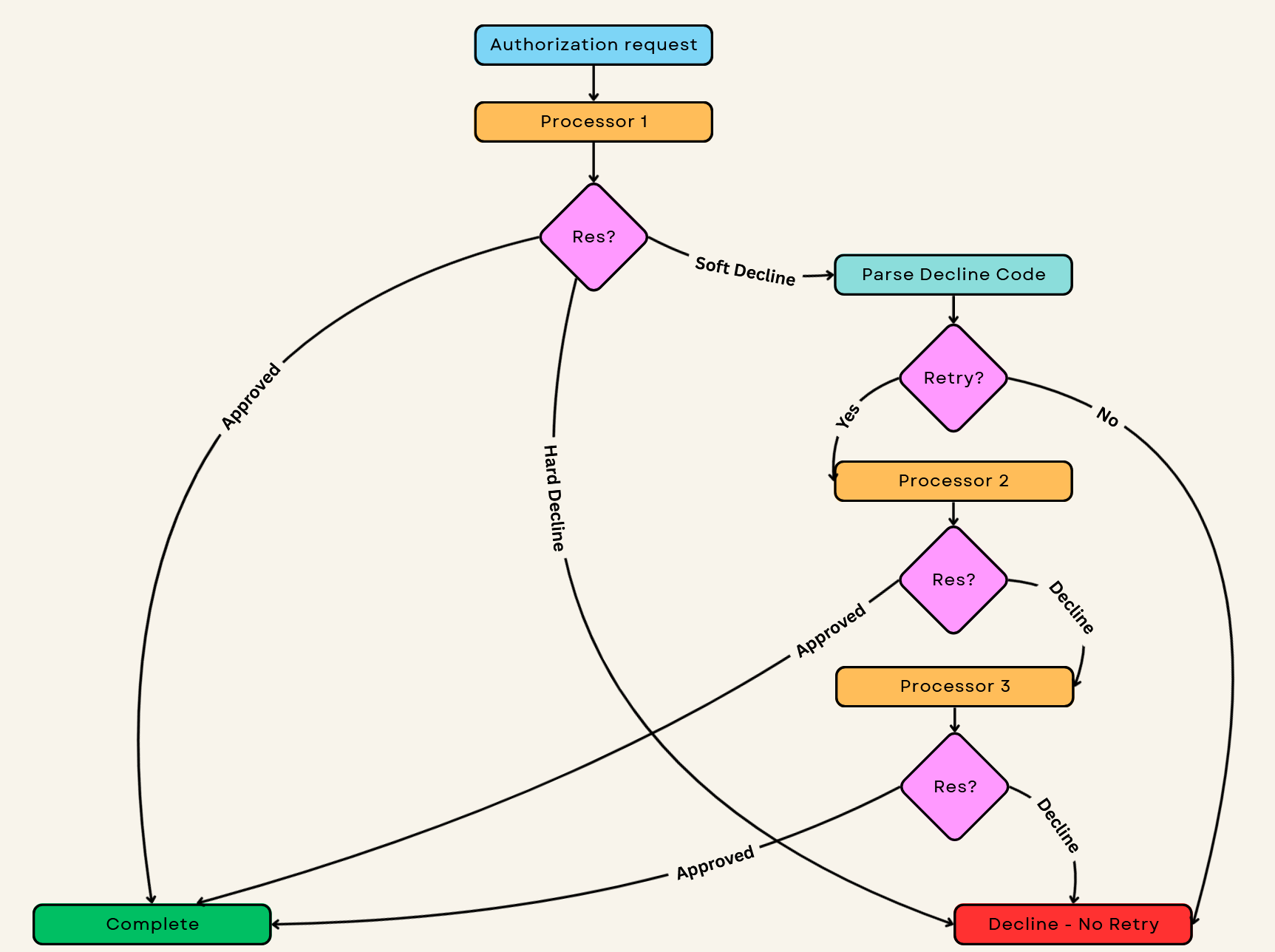
| Decline code | Meaning | Worth retrying elsewhere? |
|---|---|---|
| 14 | Invalid card | No - card is bad |
| 54 | Expired card | No - won’t work anywhere |
| 41 | Lost card | No - and flag for fraud |
| 05 | Do Not Honor | Maybe - issuer is vague |
| 51 | Insufficient Funds | No - customer needs to pay differently |
| 91 | Issuer Unavailable | Yes - immediately try backup |
The tricky part is latency. Customers won’t wait forever:
Total checkout timeout:     30 seconds
├── Routing decision:        10-50ms
├── Primary attempt:         2-8 seconds
├── First cascade:           2-8 seconds
├── Second cascade:          2-8 seconds
└── Buffer:                  2-4 seconds

Max cascades: 2. After that, they leave.
Cascading too aggressively wastes money (processor fees on doomed retries) and annoys issuers. Cascading too conservatively loses sales. Track your cascade success rate - if it’s below 10%, your logic needs tuning.
State machine
Every transaction moves through states: created → authorizing → authorized → capturing → captured. Plus failure states, partial states and the edge cases that keep you up at night.
stateDiagram-v2
    [*] --> Created: Transaction initiated

    Created --> Authorizing: Submit to processor
    Authorizing --> Authorized: Approval received
    Authorizing --> Declined: Decline received
    Authorizing --> Cascading: Soft decline, retry
    Authorizing --> TimedOut: No response

    TimedOut --> Unknown: Can't determine outcome
    Unknown --> Authorized: Processor confirms success
    Unknown --> Declined: Processor confirms failure

    Cascading --> Authorizing: Next processor
    Cascading --> Declined: No more processors

    Authorized --> Capturing: Capture requested
    Authorized --> Voided: Void requested
    Authorized --> Expired: Auth timeout

    Capturing --> Captured: Capture success
    Capturing --> CaptureFailed: Capture failed

    Captured --> PartialRefund: Partial refund
    Captured --> FullRefund: Full refund
    Captured --> Chargeback: Dispute opened

    PartialRefund --> Captured: Can refund more
    PartialRefund --> FullRefund: Refund rest

    Chargeback --> ChargebackWon: Won dispute
    Chargeback --> ChargebackLost: Lost dispute

    Declined --> [*]
    Voided --> [*]
    FullRefund --> [*]
    ChargebackWon --> [*]
    ChargebackLost --> [*]
The states nobody talks about
TimedOut. Processor didn’t respond in time. Did they charge the card? You don’t know. You can’t retry (might double-charge) and you can’t fail (might lose a valid auth). This goes to Unknown until you can query the processor or receive a webhook.
Unknown. The transaction is in limbo. Your system sent a request but never got a definitive response. You need a reconciliation job that queries processor APIs to resolve these - typically within 15-30 minutes.
AuthExpired. Authorizations don’t last forever. Visa gives you 7 days for most MCCs, 30 days for hotels/car rentals. If you don’t capture in time, the auth expires and you need to re-authorize. Track auth expiry timestamps.
Idempotency is everything
Network timeouts, cascade retries and webhook duplicates all create double-charge risk. Every state transition needs an idempotency key. If you see the same request twice, return the cached result instead of processing again.
Store the full processor response with each state transition. When something goes wrong six months later and a customer disputes, you need the evidence.
Reconciliation
Every processor settles differently:
| Processor | Settlement timing | Format | Delivery |
|---|---|---|---|
| Stripe | T+2 (standard) | JSON/CSV | API pull |
| Adyen | Configurable | CSV | SFTP push |
| dLocal | Weekly batch | CSV | SFTP |
| Legacy processors | Varies (T+3 to T+14) | PDF/CSV | Email attachment |
Yes, some still send PDFs via email. Welcome to payments.
Your job is to match each settlement line to a transaction in your system. Sounds simple. It’s not.
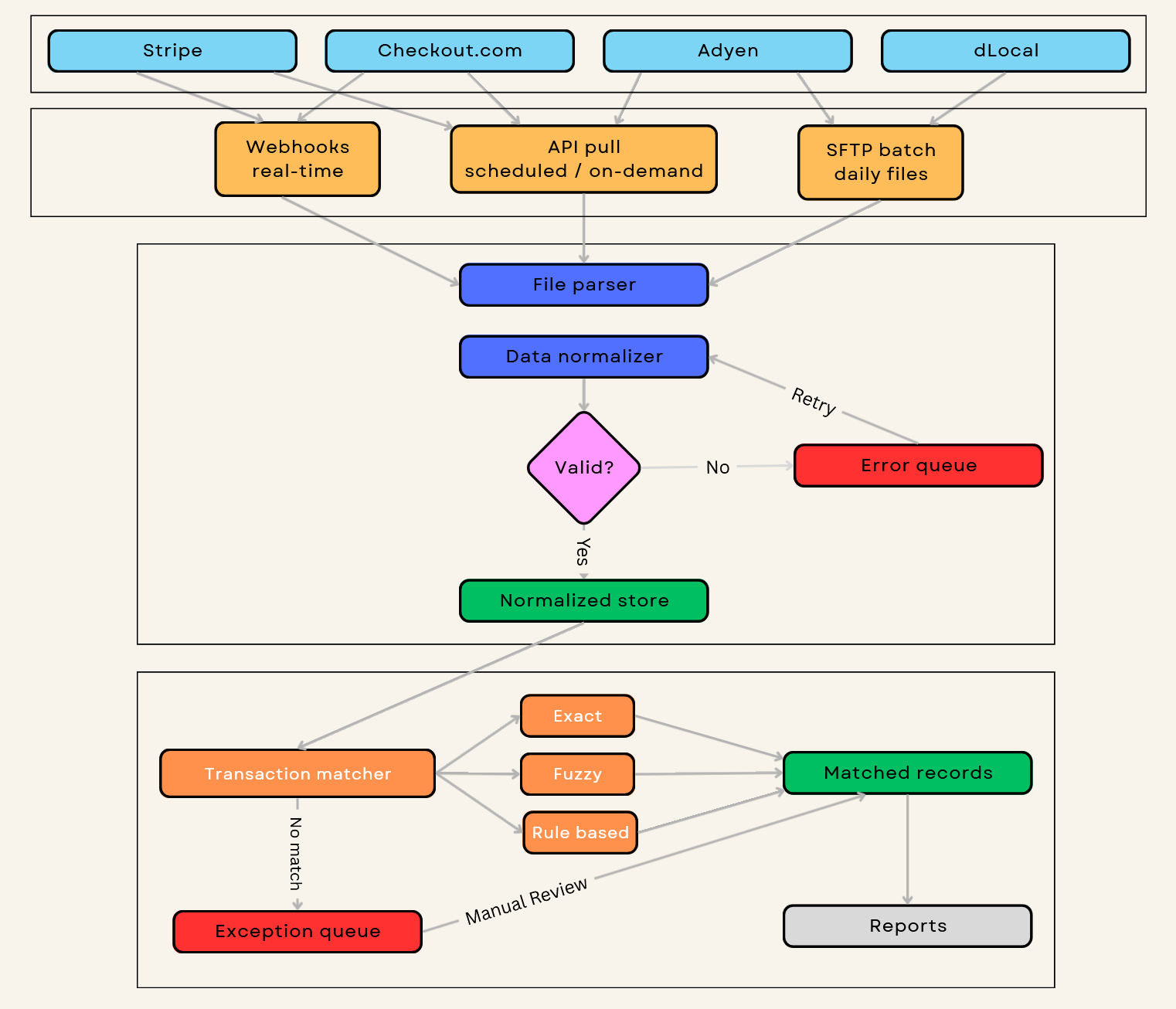
Common reconciliation failures
Currency mismatch. You authorized $100 USD but the settlement shows €92.47. The processor settles in their local currency and applied an FX rate you never saw. Solution: store both transaction currency and expected settlement currency. Accept variance up to the day’s FX spread.
Partial captures. Customer books a hotel for $500, but you only captured $450 after they skipped the minibar. One auth, one capture, but the settlement shows $450 not $500. Now add split settlements across multiple nights. Solution: link all settlements to parent authorization via a reference chain.
Timing gaps. Auth on Monday, capture on Friday, settlement the following Wednesday, chargeback three months later referencing the original auth date. Your 7-day matching window missed it. Solution: for travel/hospitality MCCs, extend matching windows to 30+ days. Index by multiple dates (auth, capture, settlement, processor date).
Fee variations. A $100 transaction settles as $97.15 on Tuesday, $97.02 on Wednesday. Same card type, same MCC. Interchange downgrades (missing L2 data), assessment fees, scheme fees, cross-border fees - all variable. Solution: configure acceptable variance thresholds (typically 0.5-1% of transaction amount). Flag anything outside the band.
Split settlements. Marketplace transaction: $100 purchase becomes three settlement lines - $85 to merchant, $10 platform fee, $5 to payment facilitator. Your system shows one transaction; the settlement file shows three. Solution: model settlement splits explicitly. Know your funds flow.
Reference ID mismatch. You sent reference “order_12345”. Processor truncated it to “order_123” or reformatted it to “ORDER12345”. Exact match fails. Solution: normalize reference IDs before comparison. Strip prefixes, lowercase, remove special characters.
Anything that doesn’t match goes to an exception queue for manual review. Keep this queue under 5% of daily volume or your finance team will mutiny. Over 10% and you have a systemic problem - probably a reference ID format change or new fee structure you didn’t account for.
Running it in production
Metrics that actually matter
authorization_rate:
  warn: < 92%
  critical: < 88%
  segment_by: [processor, country, card_type]

latency_p99:
  warn: > 4000ms
  critical: > 8000ms

cascade_rate:
  warn: > 8%
  critical: > 15%

settlement_match_rate:
  warn: < 98%
  critical: < 95%
Authorization rate is your north star. A 2-point drop on $10M monthly volume means $200K in lost revenue - transactions that would have succeeded but didn’t. Segment by processor, country and card type. A global average of 90% might hide that your Brazil corridor dropped to 70% last Tuesday.
Latency p99 directly impacts conversion. Above 4 seconds, customers start abandoning. Above 8 seconds, abandonment spikes 40%+. The p99 matters more than average - your slowest 1% of customers are still customers.
Cascade rate tells you if your primary routing is broken. If you’re cascading more than 8% of transactions, your first-choice processor is declining too much. Either your routing logic is wrong or the processor has a problem. Above 15% means you’re burning money on retry fees and annoying issuers.
Settlement match rate determines whether your finance team can close the books. Below 98%, they’re spending hours on exceptions. Below 95%, they’re drowning. Below 90%, you have a systemic bug.
Failure patterns you’ll see
Processor goes down. Your circuit breakers trip and traffic shifts to backup. But how fast? If your health checks run every 60 seconds, you’ll lose up to 60 seconds of transactions before failover kicks in. Tune check frequency against the cost of false positives.
Silent auth rate drop. Processor tweaks their risk scoring or an issuer updates their rules. Cards that worked yesterday start declining. Without per-corridor monitoring, you won’t notice for days. By then you’ve lost thousands of transactions.
Webhook storms. Processor has an outage, queues up events, recovers and dumps 6 hours of webhooks in 30 seconds. Events arrive out of order - you might get a refund webhook before the capture. Design your webhook handlers to be order-independent and idempotent.
Schema changes. Processor adds a field to their settlement file or changes a date format. Your parser throws an exception and stops processing. Validate row counts, alert on format changes, and never assume schemas are stable.
Circuit breaker pattern
You need circuit breakers to prevent cascade failures. When a processor starts failing, stop sending traffic before you burn through your entire transaction queue:
class ProcessorCircuitBreaker:
    def __init__(self, failure_threshold=5, recovery_time=30):
        self.failures = 0
        self.state = 'CLOSED'  # CLOSED = healthy, OPEN = failing
        self.last_failure = None

    def record_result(self, success: bool):
        if success:
            self.failures = 0
            self.state = 'CLOSED'
        else:
            self.failures += 1
            if self.failures >= self.failure_threshold:
                self.state = 'OPEN'
                self.last_failure = time.now()

    def should_allow_request(self) -> bool:
        if self.state == 'CLOSED':
            return True
        # half-open: allow one request to test recovery
        if time.now() - self.last_failure > self.recovery_time:
            return True
        return False
Key decisions: How many failures before opening? (5 is common.) How long before testing recovery? (30-60 seconds.) Do you count timeouts as failures? (Yes.) Do you count soft declines? (No - that’s the issuer, not the processor.)
Health check gotchas
Don’t use $0 auths for health checks. Seems clever - verify the processor is up without affecting real transactions. Some issuers rate-limit them, processors often charge fees and some issuers treat $0 auths as fraud signals. Use the processor’s status API instead. If you must use card checks, use a dedicated sandbox card and limit frequency (once per minute).
Check from multiple regions. A processor healthy in us-east-1 might be timing out in eu-west-1. If you serve global customers, run health checks from every region you serve. Route regionally when possible.
Distinguish degraded from down. 6-second response time isn’t “down” but it’s killing your conversion. Track latency percentiles, not just up/down. A processor running at p99 = 5s should trigger routing changes even if it’s technically responding.
Watch for partial failures. Processor’s auth endpoint works, but their capture endpoint is timing out. Or Visa works but Mastercard doesn’t. Health checks need to verify the actual flows you use, not just a ping endpoint.
Status pages lag reality. Processor status pages update 5-15 minutes after incidents start. Trust your own metrics first.
Summary
| Component | Own? | Use existing building blocks? | Why it matters |
|---|---|---|---|
| Vault / tokenization | No (in-house) | Yes | Limits PCI scope and liability; preserves optionality across processors. |
| Network tokens | No (in-house) | Yes | Reduces recurring churn; can lift approvals; adds integration complexity. |
| Routing | Maybe | Often | The lever for approvals, margin and resilience. Only matters if you can measure and iterate. |
| State + idempotency | Yes | Sometimes | Prevents double charges and broken lifecycles; everything downstream depends on it. |
| Webhooks + normalization | Yes | Sometimes | Required for correct state and finance; duplicates/out-of-order are normal. |
| Reconciliation | Yes | Sometimes | Determines whether the business can close books without heroics. |
The economic decision is simple: you take on complexity to buy approvals, margin and resilience. The question is when that trade is worth it.
Under ~$50M/year (rule of thumb): default to a commercial orchestration approach. At this stage, your scarcest resource is engineering focus and the risk of getting vaulting/state/reconciliation wrong is higher than the upside from squeezing basis points out of routing.
$50-150M/year: self-hosted or open-source becomes rational if you have the operational maturity to run it. This is where per-transaction fees start to hurt but you still don’t want to reinvent every component.
$150M+/year: own what differentiates (routing policy, risk controls, corridor strategy, experiments, measurement) and treat everything else as replaceable plumbing. This is where routing becomes a compounding advantage because you have enough volume to learn from your own data.
The advantage is making routing a measured operating system: hard constraints first, then approval-rate levers, then cost - continuously tuned from real outcomes. Your routing decisions are competitive advantage; your webhook parsers are not.
Whatever you do, don’t build a vault. And don’t underestimate reconciliation - it’s the thing that seems boring until it isn’t.
For why multi-processor setups make sense in the first place, see Why Merchants Use Multiple Processors.