# Debugging a slow Zola blog with an agentic performance test harness

- URL: https://runtimenotes.com/blog/debugging-a-slow-zola-blog-with-an-agentic-performance-test-harness/
- Published: 2026-10-15, updated 2026-10-16
- Tags: ai, agents, performance, cloudflare, engineering
- Summary: I built an agentic performance test harness and pointed it at my own Zola blog, which took four seconds to load on a phone. The agent found what was slowing it down and got the page ready in under a second.

*This is Part 1 of a series on building an agentic performance test harness.*

---

I noticed a couple of odd things while using my own blog. On my phone, the header and footer sometimes appeared late, as if the page was waiting for something on the backend. On my laptop, hovering over the "All writing" link sometimes left the cursor as an arrow before it changed to a pointer.

Neither made sense for a static site. [Zola](https://www.getzola.org/) generates plain HTML at build time and [Cloudflare Pages](https://pages.cloudflare.com/) serves those files directly, with no application server or database behind them. I wanted to find out what was happening, so I pointed my agentic performance test harness at it.

## The harness

I've been building this harness for a while, packaging different testing and debugging techniques into reusable skills that coding agents can orchestrate. The agent runs each technique as a script that drives a real Chrome browser:

| Technique | What it does |
|---|---|
| Visual Time Machine | Replays the load as a visitor, a frame every 100 ms |
| Network Waterfall Mapping | Maps every download on a timeline |
| Tap-in-Flight Testing | Link loading propagation |
| Main-Thread Black Box | Traces blocking tasks to the source |
| Build-to-Edge Diff | Deployed HTML against what visitors receive |
| Twin-Origin Benchmarking | Isolates the cost of custom domain settings |
| Real-User Radar | Checking lab results against real visitors' reports |
| Pixel-Parity Gate | Pixel-by-pixel visual diff |

For each symptom, the agent finds the cause, fixes it, measures again and checks that nothing else changed.

## The first load

To reproduce the problem, the harness loaded the live site on an emulated phone with [Lighthouse](https://developer.chrome.com/docs/lighthouse/overview)-style throttling: a CPU four times slower than my laptop and a 1.6 Mbit/s connection with 150 ms round trips. Most tests used [Running a coding model on RunPod](https://runtimenotes.com/blog/running-a-coding-model-on-runpod/), one of the longer posts on the site.

The page took about four seconds to reach DOMContentLoaded, the point where the browser has parsed the HTML and run the scripts that hold it up. Everything finished loading after about five seconds.

| Event | Time |
|---|---|
| First paint | 0.68&nbsp;s |
| Page ready (DOMContentLoaded) | 4.04&nbsp;s |
| Fully loaded | 5.10&nbsp;s |

The browser drew the text in system fonts at 0.68 s. It then fetched the web fonts, loaded [Mermaid](https://mermaid.js.org/) though the post has no diagrams and downloaded four diagram images further down the page. A script that Cloudflare injects also blocked the main thread for 297 ms. Fixing what the harness found in my theme and in Zola brought page ready on this post down to 0.86 s and cut its downloads from 899 KB to 227 KB. Two issues on Cloudflare's side are still open.

Chart: The RunPod post on runtimenotes.com before any of the changes in this post, on an emulated phone on slow 4G (150 ms round trips at 1.6 Mbit/s, CPU slowed four times). Bars run from the first request to the last byte. One of three loads, which agreed to within 80 ms on every mark.

<table><thead><tr><th>Part</th><th>What</th><th>From</th><th>To</th><th>Size</th></tr></thead><tbody><tr><td>On screen</td><td>blank</td><td>0.00 s</td><td>0.68 s</td><td></td></tr><tr><td>On screen</td><td>text in system fonts</td><td>0.68 s</td><td>3.70 s</td><td></td></tr><tr><td>1 web fonts, from Google</td><td>downloading</td><td>0.51 s</td><td>3.63 s</td><td>173 KB</td></tr><tr><td>2 Mermaid library</td><td>downloading</td><td>0.71 s</td><td>3.89 s</td><td>81 KB</td></tr><tr><td>3 four diagram images</td><td>downloading</td><td>0.22 s</td><td>5.08 s</td><td>625 KB</td></tr><tr><td>4 Cloudflare bot check</td><td>downloading</td><td>4.03 s</td><td>5.20 s</td><td>11 KB</td></tr><tr><td>4 Cloudflare bot check</td><td>main thread blocked</td><td>4.57 s</td><td>4.87 s</td><td></td></tr></tbody></table>

## Visual Time Machine: Google Fonts draws text twice

The filmstrip showed the browser drawing the page in system fonts first. When Google Fonts finished loading, the text changed shape: the headline rewrapped and the logo appeared last. On the home page the body font arrived 0.9 s after first paint and the logo font later still. That logo font was 73 KB for a wordmark with ten different letters.

My theme loaded Google Fonts the usual way. The page requests a stylesheet from `fonts.googleapis.com`, which points to the font files on `fonts.gstatic.com`. The browser can't request a font until that stylesheet arrives. The stylesheet also sets `font-display: swap`, which shows text in a system font straight away and swaps in the web font when it lands.

### Hosting and preloading the fonts

I moved the font files into the site and preloaded the faces used at the top of the page. A preload starts the download before the browser finds the font in the stylesheet:

```html
<link rel="preload" href="https://runtimenotes.com/fonts/caveat-wordmark.woff2"
      as="font" type="font/woff2" crossorigin>
```

For the logo, Google Fonts' `text` parameter returns a font with only the characters you ask for. For "Runtime Notes" that cut the Caveat font from 73 KB to 6 KB:

```text
https://fonts.googleapis.com/css2?family=Caveat:wght@700&text=Runtime%20Notes
```

Self-hosting also changed the caching. Google lets browsers cache its font files for a year, while Cloudflare gave my static files four hours. Cloudflare Pages reads a `_headers` file, so I added a rule for the fonts:

```text
/fonts/*
  Cache-Control: public, max-age=31536000, immutable
```

If a font ever changes, a new file name keeps the year-long cache safe.

### What changed

This is how long each page waited for its web fonts after first paint, on slow and regular 4G:

Chart: Median of three loads each, emulated phone (390 px wide, CPU slowed 4×). Slow 4G is 150 ms round trips at 1.6 Mbit/s; 4G is 40 ms at 9 Mbit/s. “Fonts settled” is when the browser reports the last web font on the page loaded. On posts that is the italic face, which is not preloaded.

<table><thead><tr><th>Page</th><th></th><th>First paint</th><th>Fonts settled</th><th>Stand-in fonts</th></tr></thead><tbody><tr><td>Home page, slow 4G</td><td>before</td><td>0.54 s</td><td>1.79 s</td><td>1.25 s</td></tr><tr><td>Home page, slow 4G</td><td>after</td><td>0.74 s</td><td>0.84 s</td><td>0.09 s</td></tr><tr><td>A post, slow 4G</td><td>before</td><td>0.64 s</td><td>3.63 s</td><td>2.99 s</td></tr><tr><td>A post, slow 4G</td><td>after</td><td>0.80 s</td><td>1.25 s</td><td>0.46 s</td></tr><tr><td>Home page, 4G</td><td>before</td><td>0.29 s</td><td>0.55 s</td><td>0.26 s</td></tr><tr><td>Home page, 4G</td><td>after</td><td>0.33 s</td><td>0.32 s</td><td>0.00 s</td></tr><tr><td>A post, 4G</td><td>before</td><td>0.38 s</td><td>0.91 s</td><td>0.54 s</td></tr><tr><td>A post, 4G</td><td>after</td><td>0.50 s</td><td>0.57 s</td><td>0.08 s</td></tr></tbody></table>

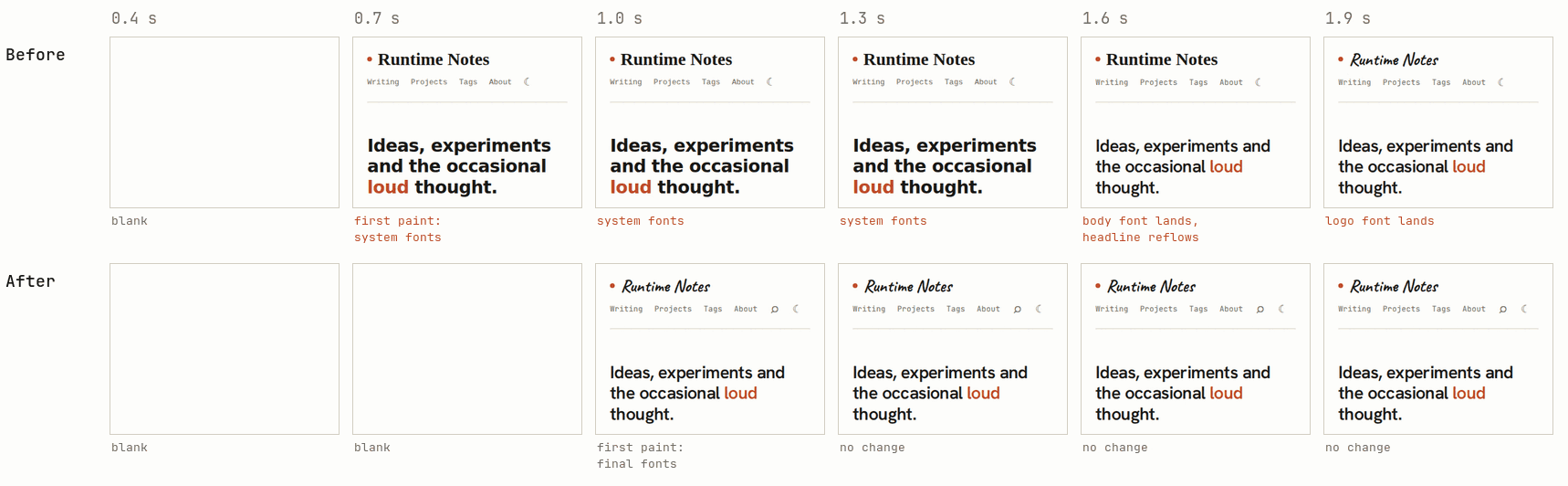
On the RunPod post the fonts settled about 2.4 s sooner. On the home page, the system fonts used to appear at 0.7 s, the text reflowed at 1.6 s and the logo arrived at 1.9 s. Now the page stays blank until about 1.0 s, then appears with its final fonts and doesn't reflow:

<figure class="wide filmstrip"><div class="chart-scroll"><img src="https://runtimenotes.com/phone-perf-filmstrip.png" width="1718" height="532" loading="lazy" decoding="async" alt="Filmstrip of the top of the home page. Before: system fonts at 0.7 s, a reflow at 1.6 s and the logo at 1.9 s. After: blank until 1.0 s, then the final page with no further change."></div><figcaption>Top of the home page, emulated phone on slow 4G. Before is the old code, after is the new one.</figcaption></figure>

The cost is a slightly later first paint: 0.1 to 0.2 s on slow 4G and 40 to 120 ms on regular 4G. Preloading isn't always worth it either. The new design's home page is drawn on a canvas. Preloading its fonts there moved first paint from 0.62 s to 0.85 s without improving what appeared, so that page skips the preload.

## Network Waterfall Mapping: Mermaid loads on every page

The network waterfall showed Mermaid, the library that turns text into diagrams, loading on every page. Zola has no built-in Mermaid support, so my theme imported it with a module script whether the page had a diagram or not. That cost an 81 KB download and 335 KB of JavaScript to parse.

Module scripts also delay DOMContentLoaded until they finish. On the RunPod post, which has no diagram, Mermaid was still downloading at 3.9 s and held up most of the four-second wait.

### Loading Mermaid only on pages with a diagram

A first version looked for diagrams in the browser and used a dynamic `import()` only when it found one. That alone brought page ready on the RunPod post from about 4 s to 0.8 s. Later I moved the check into the build, where a Zola template can see the rendered post. Here it is with the rendering code left out:

```jinja
{% if page.content is containing("language-mermaid") %}
<script type="module">
  import mermaid from 'https://cdn.jsdelivr.net/npm/mermaid@10/dist/mermaid.esm.min.mjs';
  // Turn each pre code.language-mermaid block into a diagram.
</script>
{% endif %}
```

The numbers come from the browser-side check. The build-time check also saves sending that small script.

## Tap-in-Flight Testing: lazy images break heading links

With the fonts and Mermaid fixed, the waterfall pointed at the images. The RunPod post's four diagrams total 625 KB. All four started downloading with the page, though none was on the first screen, so they competed with the fonts and stylesheet for a 1.6 Mbit/s connection.

Lazy loading should help: `loading="lazy"` tells the browser to wait until an image is near the screen. Zola can add it to every Markdown image:

```toml
lazy_async_image = true
```

Before Zola 0.23, though, `lazy_async_image` could blank the `id` of every heading after the first image, which breaks table-of-contents links and shared `#section` links. It's [Zola issue #2679](https://github.com/getzola/zola/issues/2679), reported on 0.19.2 and still present in 0.21 and 0.22. Cloudflare Pages builds with whichever Zola version your build command installs, so check yours.

Zola's Markdown images also have no `width` or `height`, so the browser doesn't know how much room an image needs until it arrives. When it does, everything below it moves. To measure that, the harness loaded the RunPod post on slow 4G, waited two seconds and tapped the contents link for section 6. The heading should land just below the 46 px section bar. Without sizes it ended up 375 px too low, because the browser scrolled to it before the images above it arrived and pushed it down.

Chart: The RunPod post on an emulated phone on slow 4G. Two seconds into the load I tap the contents link for section 6 and wait for the scroll to finish. The dashed line is where the page asks the heading to land, just under the 46 px section bar. Each result repeated in three runs.

<table><thead><tr><th>Images</th><th>Heading ends at</th><th>Off by</th><th>Layout shift after the tap</th></tr></thead><tbody><tr><td>Lazy, with sizes</td><td>60 px</td><td>+0 px</td><td>0.001</td></tr><tr><td>Lazy, no sizes</td><td>435 px</td><td>+375 px</td><td>0.112</td></tr><tr><td>Not lazy, no sizes</td><td>28 px</td><td>-32 px</td><td>0.002</td></tr></tbody></table>

### Adding image sizes at build time

Zola's `get_image_metadata` reads an image's dimensions during the build. A macro in Tera, Zola's template language, uses it to add `width`, `height`, `loading="lazy"` and `decoding="async"` to every image tag in the rendered post. A simplified version:

```jinja
{%- set parts = html | split(pat='<img src="') -%}
{%- set_global out = parts | first -%}
{%- for part in parts | slice(start=1) -%}
  {%- set src = part | split(pat='"') | first -%}
  {%- set meta = get_image_metadata(path=src | trim_start_matches(pat="/"), allow_missing=true) -%}
  {%- if meta -%}
    {%- set_global out = out ~ '<img width="' ~ meta.width ~ '" height="' ~ meta.height
        ~ '" loading="lazy" decoding="async" src="' ~ part -%}
  {%- else -%}
    {%- set_global out = out ~ '<img src="' ~ part -%}
  {%- endif -%}
{%- endfor -%}
{{ out | safe }}
```

The full version also skips images that already have a width. With sizes set, section 6 landed in place in all three runs. With the font and Mermaid changes already in, lazy loading cut downloads in the first eight seconds from 755 KB to 227 KB and the fully loaded time from 4.18 s to 1.57 s.

### After the first three changes

Page ready moved from 3.97 s to 0.80 s. The fonts now load alongside the stylesheet, Mermaid is gone from posts without diagrams and three of the four images wait until the reader scrolls near them:

Chart: One load of the RunPod post on emulated slow 4G, before and after. Bars run from request to last byte; sizes are what crossed the network. “Page ready” is DOMContentLoaded. After the change the fonts start with the stylesheet, mermaid is not requested and three of the four diagram images wait until the reader scrolls near them.

<table><thead><tr><th>Load</th><th>Request</th><th>Start</th><th>End</th><th>Size</th></tr></thead><tbody><tr><td>Before</td><td>HTML page</td><td>0.00 s</td><td>0.21 s</td><td>11 KB</td></tr><tr><td>Before</td><td>style.css</td><td>0.18 s</td><td>0.44 s</td><td>5 KB</td></tr><tr><td>Before</td><td>Google Fonts CSS</td><td>0.19 s</td><td>0.42 s</td><td>1 KB</td></tr><tr><td>Before</td><td>logo font</td><td>0.46 s</td><td>3.59 s</td><td>73 KB</td></tr><tr><td>Before</td><td>body font</td><td>0.46 s</td><td>2.38 s</td><td>34 KB</td></tr><tr><td>Before</td><td>mono font</td><td>0.46 s</td><td>2.24 s</td><td>31 KB</td></tr><tr><td>Before</td><td>italic font</td><td>0.46 s</td><td>2.39 s</td><td>35 KB</td></tr><tr><td>Before</td><td>mermaid</td><td>0.66 s</td><td>3.83 s</td><td>81 KB</td></tr><tr><td>Before</td><td>diagram 1</td><td>0.19 s</td><td>3.50 s</td><td>93 KB</td></tr><tr><td>Before</td><td>diagram 2</td><td>0.19 s</td><td>4.57 s</td><td>157 KB</td></tr><tr><td>Before</td><td>diagram 3</td><td>0.24 s</td><td>4.71 s</td><td>166 KB</td></tr><tr><td>Before</td><td>diagram 4</td><td>0.24 s</td><td>4.93 s</td><td>207 KB</td></tr><tr><td>Before</td><td>analytics</td><td>0.19 s</td><td>0.53 s</td><td>3 KB</td></tr><tr><td>After</td><td>HTML page</td><td>0.00 s</td><td>0.23 s</td><td>15 KB</td></tr><tr><td>After</td><td>style.css</td><td>0.19 s</td><td>0.54 s</td><td>8 KB</td></tr><tr><td>After</td><td>Google Fonts CSS</td><td></td><td></td><td>not requested</td></tr><tr><td>After</td><td>logo font</td><td>0.19 s</td><td>0.49 s</td><td>6 KB</td></tr><tr><td>After</td><td>body font</td><td>0.19 s</td><td>0.80 s</td><td>34 KB</td></tr><tr><td>After</td><td>mono font</td><td>0.19 s</td><td>0.78 s</td><td>31 KB</td></tr><tr><td>After</td><td>italic font</td><td>0.58 s</td><td>1.21 s</td><td>35 KB</td></tr><tr><td>After</td><td>mermaid</td><td></td><td></td><td>not requested</td></tr><tr><td>After</td><td>diagram 1</td><td>0.78 s</td><td>1.55 s</td><td>93 KB</td></tr><tr><td>After</td><td>diagram 2</td><td></td><td></td><td>waits until you scroll near it</td></tr><tr><td>After</td><td>diagram 3</td><td></td><td></td><td>waits until you scroll near it</td></tr><tr><td>After</td><td>diagram 4</td><td></td><td></td><td>waits until you scroll near it</td></tr><tr><td>After</td><td>analytics</td><td>0.19 s</td><td>0.52 s</td><td>3 KB</td></tr></tbody></table>

## Main-Thread Black Box: a freeze after the page is ready

About half a second after DOMContentLoaded, the phone's main thread still froze for about 300 ms. The main thread runs JavaScript and also handles taps, clicks and cursor updates, so they all wait during a long task. That was the cursor I'd seen stick on my laptop, where the same task took 59 to 108 ms.

The black box records every task longer than 50 ms and the script or frame that ran it. The 297 ms task belonged to a hidden iframe that nothing in my code creates:

Chart: Long tasks (over 50 ms) on the main thread of the live site, before any fix. The browser cannot react to a tap or update the cursor during one. The Cloudflare task is attributed to the hidden iframe the injected script creates; it starts as soon as that script arrives, which is requested at “page ready”. Phone numbers are from one of three loads that agreed within 20 ms.

<table><thead><tr><th>Load</th><th>Task</th><th>Starts</th><th>Blocks for</th></tr></thead><tbody><tr><td>Phone, a post</td><td>the page&#x27;s own start-up</td><td>0.49 s</td><td>171 ms</td></tr><tr><td>Phone, a post</td><td>mermaid starting up</td><td>3.90 s</td><td>104 ms</td></tr><tr><td>Phone, a post</td><td>Cloudflare bot check</td><td>4.57 s</td><td>297 ms</td></tr><tr><td>Desktop, Writing</td><td>Cloudflare bot check</td><td>0.69 s</td><td>64 ms</td></tr></tbody></table>

## Build-to-Edge Diff: Cloudflare injects a bot check

The Build-to-Edge Diff compares the HTML Zola builds with what visitors receive. You can do a rough version with `curl`:

```sh
curl -s https://runtimenotes.com/ | tail -c 600
```

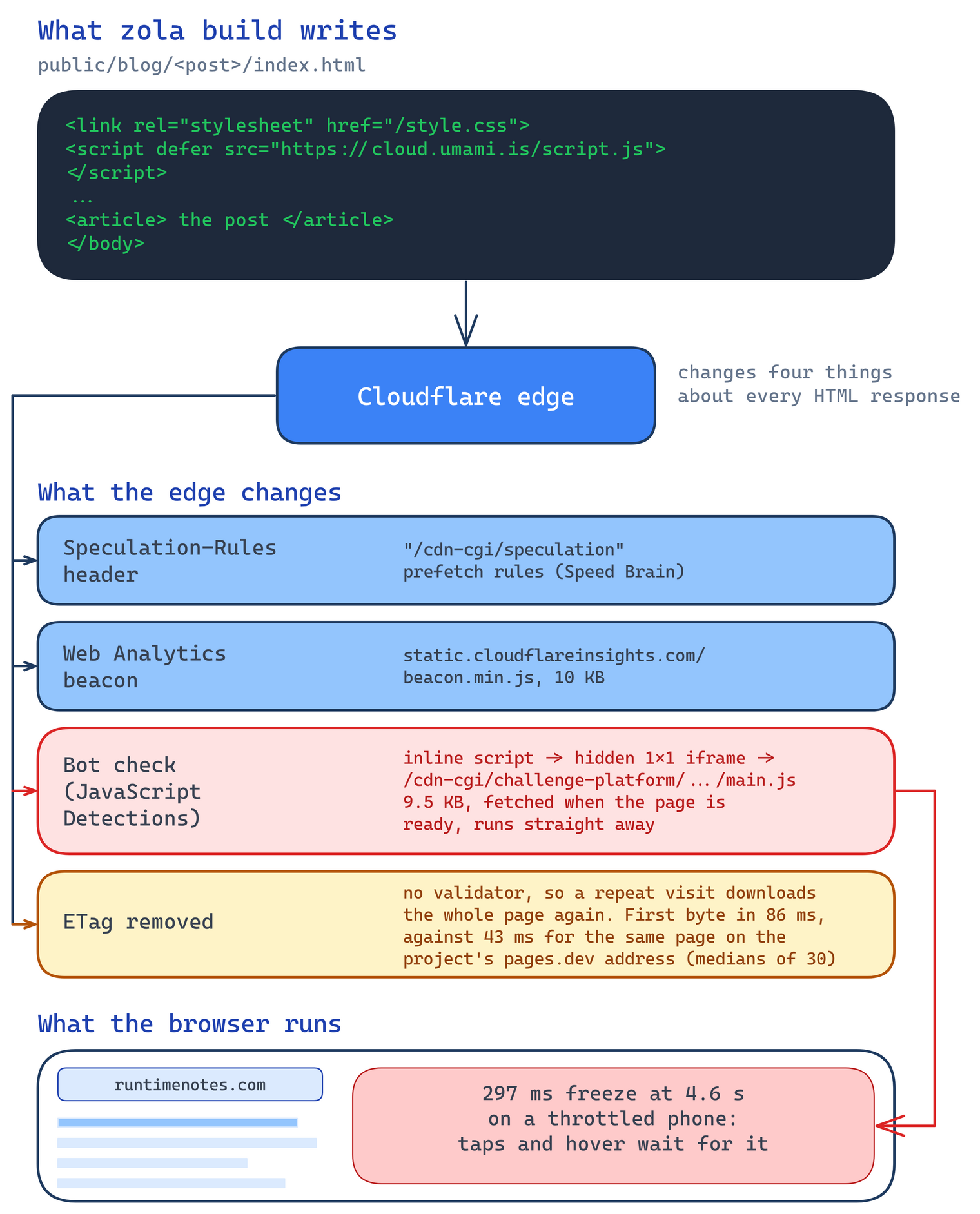
The last few hundred bytes held an inline script that isn't in Zola's output. Cloudflare adds it while serving the page, along with an analytics script and a `Speculation-Rules` header. It also removes the ETag.

<figure class="wide"><div class="chart-scroll"><img src="https://runtimenotes.com/phone-perf-edge.png" width="1520" height="1883" loading="lazy" decoding="async" alt="Diagram: the HTML Zola writes passes through the Cloudflare edge, which adds a Speculation-Rules header, an analytics script and a bot check and drops the ETag. The bot check's hidden iframe loads main.js, which froze a throttled phone for 297 ms."></div></figure>

The script is Cloudflare's JavaScript Detections, which checks whether a browser looks automated. It comes with Bot Fight Mode, a free setting that challenges traffic matching known bot patterns. After DOMContentLoaded it adds a hidden iframe that loads a 9.5 KB `main.js`. The iframe shares the page's origin, so the script runs on the page's main thread.

Cloudflare's [documentation](https://developers.cloudflare.com/bots/reference/javascript-detections/) says the script is deferred and uses a separate thread where available. In my runs it ran on the main thread. A [Cloudflare Community thread](https://community.cloudflare.com/t/bot-fight-mode-raises-total-blocking-time-on-speed-test/418287) reports Total Blocking Time rising from 80 ms to 1,530 ms after enabling Bot Fight Mode. A [GitHub issue](https://github.com/ComputerJy/computerjy/issues/134) from September 2026 traces most of another site's blocking time to the same script.

### Turning off Bot Fight Mode

On the free plan, the documentation says JavaScript Detections can't be turned off separately from Bot Fight Mode, which also does the bot blocking. This blog has no forms, logins or server code, so I turned Bot Fight Mode off for the whole domain. Cloudflare kept injecting the script. It was still there on 15 October 2026. On a paid plan, Super Bot Fight Mode can turn it off. On the free plan I haven't found a way.

### Speed Brain

The `Speculation-Rules` header comes from Speed Brain, which tells Chrome to prefetch a page when the visitor presses a link. A normal click holds the button down for about 120 ms, which is the head start the prefetch gets. The next page's first byte arrived after 125 ms with Speed Brain and 126 ms without. Hovering doesn't start a prefetch, so it doesn't waste requests either. I left it on.

## Twin-Origin Benchmarking: custom domain drops the ETag

Every Cloudflare Pages project also has a `pages.dev` address that serves the same files without the custom domain's settings. The harness compared the RunPod post on both.

An ETag is a version tag on a response. A returning browser sends it back. If the page hasn't changed, the server answers `304 Not Modified` without the body. On `pages.dev` the HTML had an ETag and a repeat request got a 304. On `runtimenotes.com` there was no ETag or Last-Modified header, so every repeat visit downloaded the HTML again. You can compare the two addresses for your own project:

```sh
curl -sI https://<project>.pages.dev/ | grep -i etag
curl -sI https://<your-domain>/ | grep -i etag
```

The custom domain was slower too. The harness timed 30 requests to each address, plus `style.css` on the custom domain, which was already cached at the edge:

Chart: Thirty requests to each, interleaved, from my connection to Cloudflare’s Singapore data centre. Each dot is one request. The time runs from the request being sent to the first byte arriving, so it includes one round trip (about 20 ms here) as well as the time spent on Cloudflare’s side.

<table><thead><tr><th>Request</th><th>Samples</th><th>Median</th><th>p25</th><th>p75</th><th>Slowest</th></tr></thead><tbody><tr><td>The post on its pages.dev address</td><td>30</td><td>43 ms</td><td>41 ms</td><td>65 ms</td><td>104 ms</td></tr><tr><td>The post on runtimenotes.com</td><td>30</td><td>86 ms</td><td>75 ms</td><td>115 ms</td><td>135 ms</td></tr><tr><td>style.css on runtimenotes.com</td><td>30</td><td>31 ms</td><td>26 ms</td><td>37 ms</td><td>46 ms</td></tr></tbody></table>

For the same HTML, the custom domain took twice as long as `pages.dev`: a median of 86 ms against 43 ms. The edge-cached stylesheet took 31 ms. Cloudflare's [ETag documentation](https://developers.cloudflare.com/cache/reference/etag-headers/) lists HTML-rewriting features that can remove ETags, including Email Obfuscation and Automatic HTTPS Rewrites. I haven't found which one applies here yet. Next I'll turn them off one at a time and see if the ETag comes back.

## Real-User Radar: layout jump on desktop

Every lab test so far ran on an emulated phone, so it missed a problem on wide screens. Real-User Radar reads Cloudflare Web Analytics, which measures real visits in readers' browsers. On 2 September 2026 it recorded a layout shift of 1.0 on [the interchange fees post](https://runtimenotes.com/blog/interchange-fees-explained-why-merchants-pay-2-3-on-every-card-transaction/). Google rates anything above 0.25 as poor.

The cause was the old design's contents drawer, a side panel with the post's headings that opened by default on screens 1080 px and wider. The harness reproduced the jump at 1440 px on slow 4G with the CPU slowed four times. The live page scored 0.40 on every run.

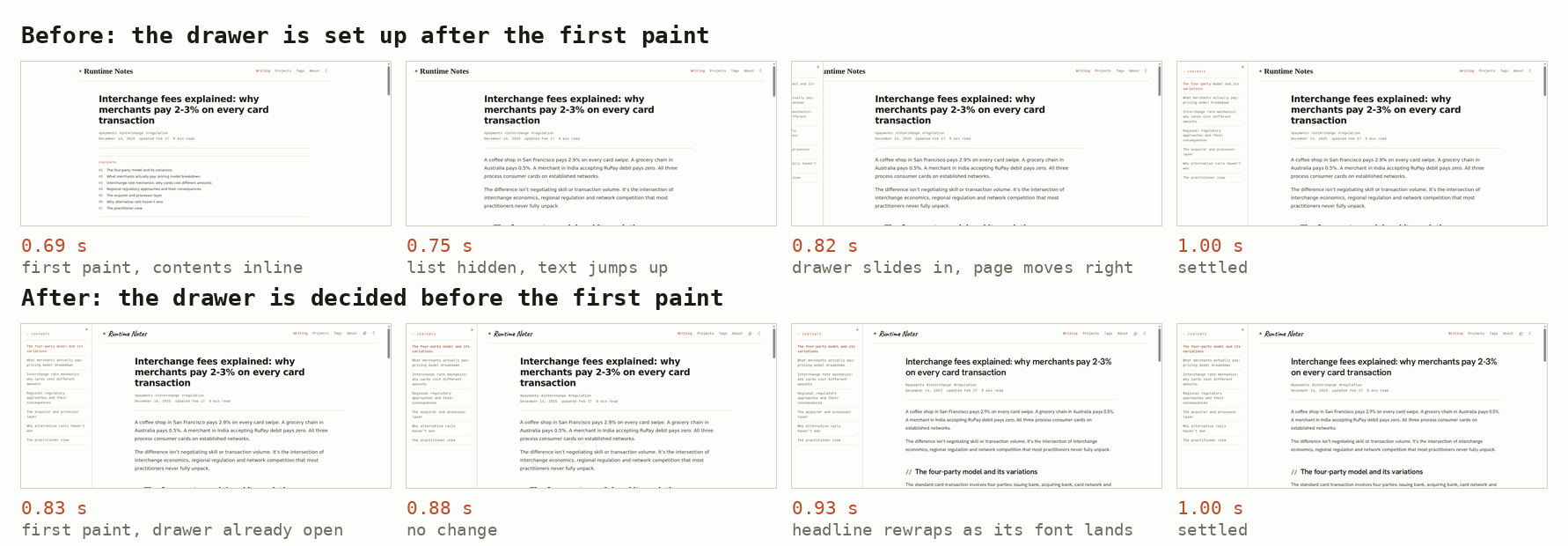
The Visual Time Machine, recording every painted frame this time, showed why. The script that opened the drawer sat at the end of the article, so on a slow load the browser first drew the page with the contents inline at the top. When the script ran, it hid the list, moved the text up and slid the drawer in. Chrome counted each frame of that movement as a layout shift.

### Deciding the layout before the first paint

The browser needed to know whether the drawer was open before it drew anything. A short script in the `<head>` now checks the screen width and whether the reader last left the drawer open, then sets two classes. The stylesheet uses them to place the article beside the drawer from the first frame:

```js
if (matchMedia('(min-width: 1080px)').matches) {
  document.documentElement.classList.add('toc-js');
  if (localStorage.getItem('toc-collapsed') !== '1') {
    document.documentElement.classList.add('toc-open');
  }
}
```

Before, the page appeared centred with the contents inline at 0.69 s, the text jumped up at 0.75 s and the drawer was sliding in at 0.82 s. Now the drawer is open from the first frame. The only movement left is the headline rewrapping at 0.93 s when its font arrives. The layout shift fell to 0.037.

<figure class="wide filmstrip"><div class="chart-scroll"><img src="https://runtimenotes.com/perf-desktop-drawer.png" width="1782" height="620" loading="lazy" decoding="async" alt="Desktop frames of the interchange fees post on slow 4G. Before: a centred page with the contents inline at 0.69 s, the text jumping up at 0.75 s and the drawer sliding in at 0.82 s. After: the drawer is open from the first frame and only the headline rewraps, at 0.93 s."></div><figcaption>The interchange fees post at 1440 px on slow 4G with the CPU slowed four times. Times are from the start of the load.</figcaption></figure>

## Pixel-Parity Gate: nothing visible changed

The Pixel-Parity Gate checks that a speed fix didn't change how the site looks. It serves the build from before and after a change, screenshots every page at phone and desktop widths and compares them pixel by pixel. When I moved the fixes to the site's new design, the before and after screenshots were identical.

## Results

Both fixed builds now reach page ready in under a second, down from 4.02 s: 0.86 s on the old design and 0.65 s on the new one. The harness measured the old design, the old design with the fixes and the new design with the same fixes in one session on 15 October 2026.

Chart: The RunPod post on an emulated phone over slow 4G. Medians of three loads of each build, all measured in one session on 15 October 2026. “Page ready” is DOMContentLoaded. Hollow circles are the old design, filled circles the old design with the fixes and diamonds the new design with the same fixes.

<table><thead><tr><th>Page</th><th>Measure</th><th>Old design</th><th>Old design, fixed</th><th>New design, fixed</th></tr></thead><tbody><tr><td>The RunPod post</td><td>First paint</td><td>0.70 s</td><td>0.79 s</td><td>0.95 s</td></tr><tr><td>The RunPod post</td><td>Fonts settled</td><td>3.70 s</td><td>1.26 s</td><td>2.23 s</td></tr><tr><td>The RunPod post</td><td>Page ready</td><td>4.02 s</td><td>0.86 s</td><td>0.65 s</td></tr><tr><td>The RunPod post</td><td>Fully loaded</td><td>4.95 s</td><td>1.56 s</td><td>2.23 s</td></tr><tr><td>The RunPod post</td><td>Downloaded in the first 8 s</td><td>899 KB</td><td>227 KB</td><td>368 KB</td></tr></tbody></table>

| RunPod post on slow 4G | Old design | Old design, fixed | New design, fixed |
|---|---|---|---|
| Page ready | 4.02 s | 0.86 s | 0.65 s |
| Fully loaded | 4.95 s | 1.56 s | 2.23 s |
| Fonts settled | 3.70 s | 1.26 s | 2.23 s |
| First paint | 0.70 s | 0.79 s | 0.95 s |
| Downloaded | 899 KB | 227 KB | 368 KB |

The new design takes longer to finish loading because its serif font is heavier. Source Serif 4 with its optical sizes is 122 KB for the regular face and 50 KB for italic, while the old design's Hanken Grotesk was about 35 KB for each. First paint also moved from 0.70 s to 0.95 s.

Each technique's finding and its result:

| Technique | Found | Result |
|---|---|---|
| Visual Time Machine | Text drawn twice | Fonts 2.4 s sooner, first paint 0.1 s later |
| Network Waterfall Mapping | Mermaid on every page | Page ready under 1 s |
| Tap-in-Flight Testing | Images moving headings | 755 KB to 227 KB on load |
| Main-Thread Black Box | A 297 ms freeze | Traced to Cloudflare |
| Build-to-Edge Diff | Injected bot check | No fix on the free plan |
| Twin-Origin Benchmarking | No ETag on the custom domain | Cause not found yet |
| Real-User Radar | Desktop layout jump | 0.40 to 0.037 |
| Pixel-Parity Gate | Nothing visible changed | Identical screenshots |

If your Zola site runs on Cloudflare Pages, run the `curl` checks against your own domain. They show whether Cloudflare adds the bot-check script and drops the ETag on your pages too.

I've since tested the harness on 23 live sites. It also found a font reflow problem on this blog and helped me fix it. More on both in the second post of this series.