This is Part 3 of a series on building AI memory that learns. Part 1 covered the landscape. Part 2 covered the engine. This post covers integration.
The engine works. Now how do I make it usable across everything I work with: agents, editors, scripts and task systems?
The Goal (and Why It’s Hard)
One memory database, used everywhere.
The problem: I use Claude Code for terminal work, Cursor for editing, sometimes OpenCode, WSL2 or custom scripts. Each starts fresh. When one agent learns something useful, the others don’t know about it. And none of them remember what worked last week.
The harder problem: even if they shared a memory store, how does the store know which memories are actually good? Manual curation doesn’t scale.
The Integration Principle
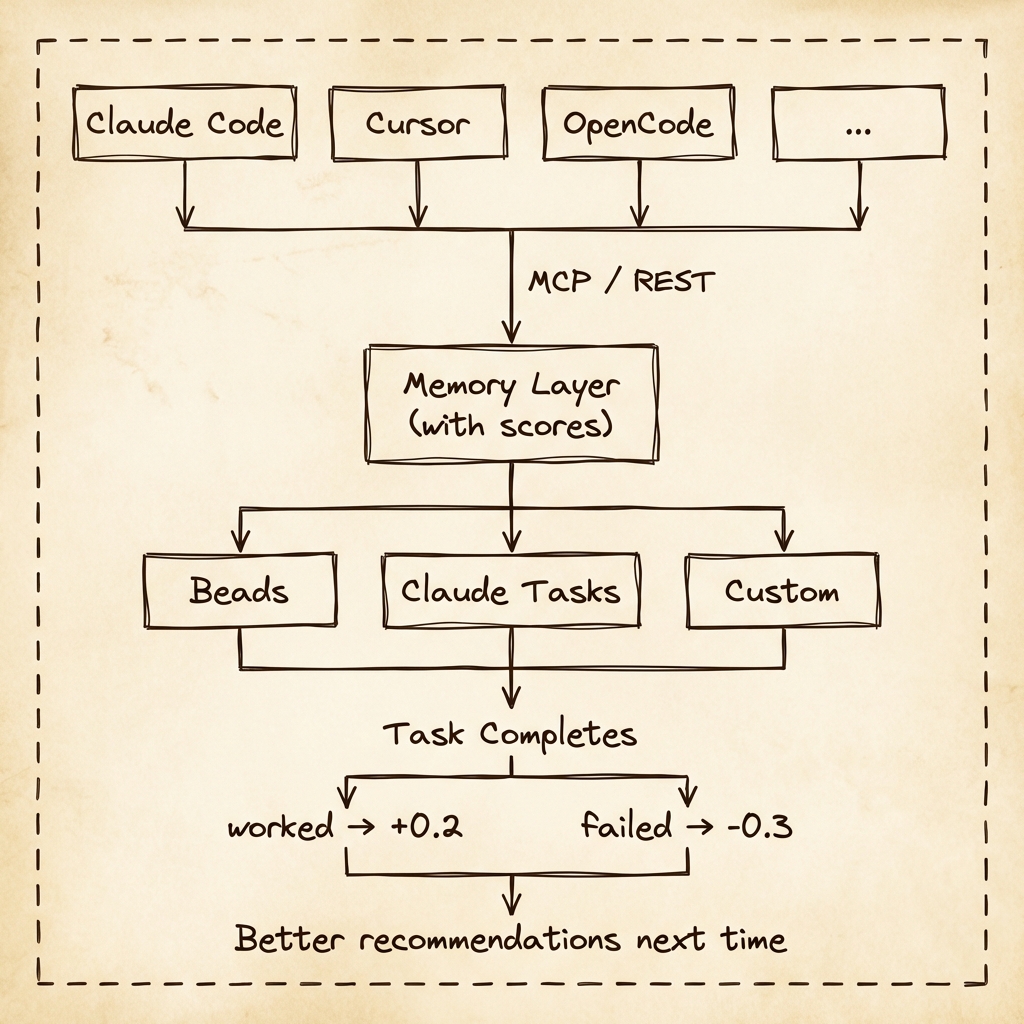
The goal is simple: make one memory database accessible across multiple entry points, in different environments.
| Environment | Interface | Why it exists |
|---|---|---|
| Cursor, OpenCode, Windsurf | MCP | Agent-native tool calls |
| CI/CD, scripts, dashboards | REST | Stable HTTP interface |
| Custom tools | SDK | Typed embedding, no shelling out |
| Everywhere else | CLI | Debugging and glue |
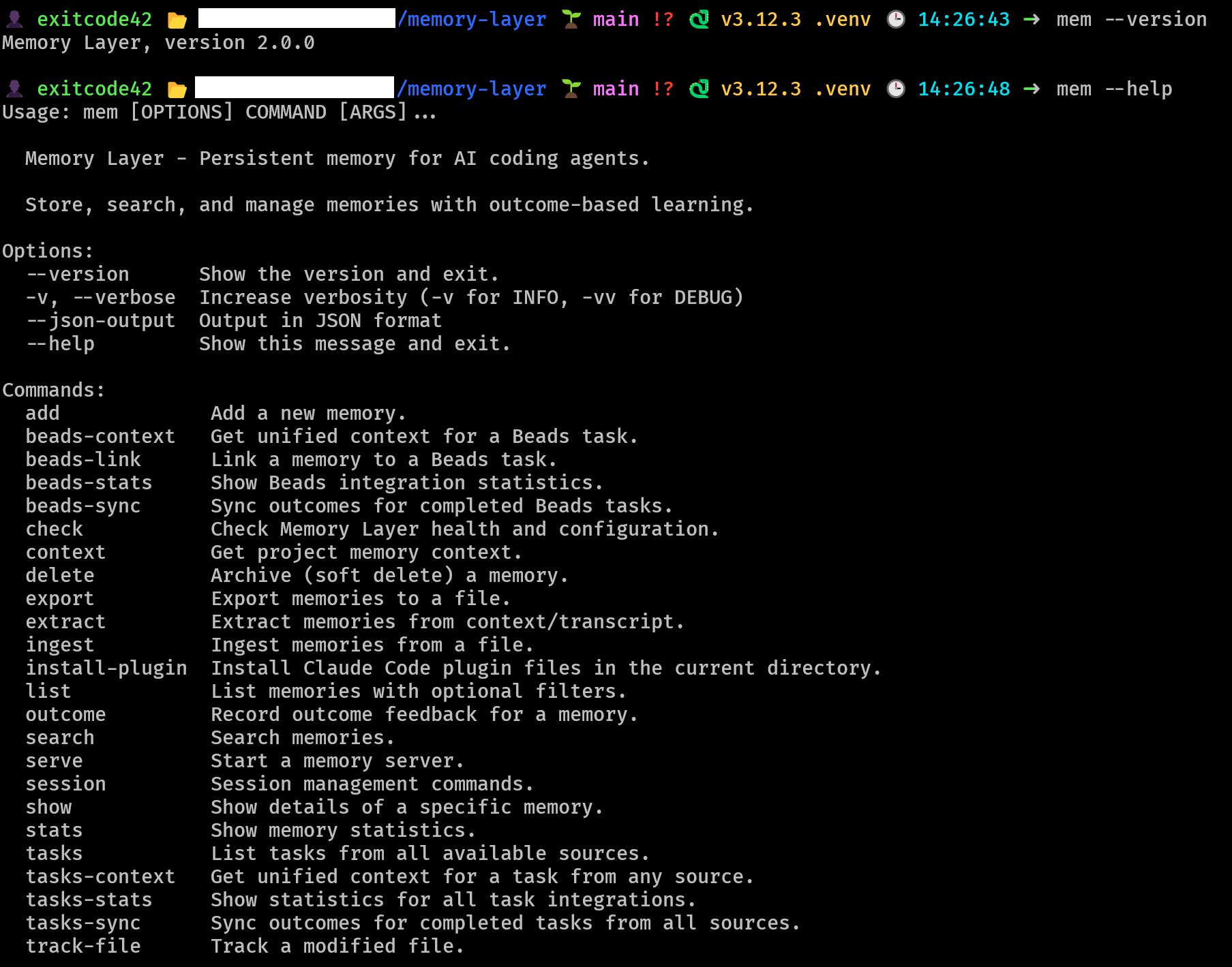
I tried to make MCP “the one interface,” but it only solves the agent side. CI jobs don’t speak MCP. Small scripts shouldn’t need JSON-RPC. And I don’t want every custom tool to shell out. The split is: MCP for agents, REST for automation, SDK for embedding, CLI for everything else.
They all point at the same SQLite store.
Tasks Are the Feedback Engine
Memory is only useful if it improves without constant curation. Tasks provide the cleanest feedback signal in daily work. “This task shipped” is a stronger signal than “I liked this answer.”
When work completes, Memory Layer promotes the memories that actually helped - without manual supervision.
A Concrete Flow
- Task: “Fix auth bug”
- Agent pulls
gotcha+troubleshootingmemories - Apply the fix, task closes
- Linked memories get +0.2
- Next time, those memories rank higher everywhere
- Bad advice sinks without manually pruning it
This is why tasks matter. They are the mechanism that closes the loop.
Why Two Task Systems?
If you look at the task integration layer (especially after Claude turned Todos into Tasks) a fair question would be:
“Why Beads and Claude Tasks? Isn’t that redundant?”
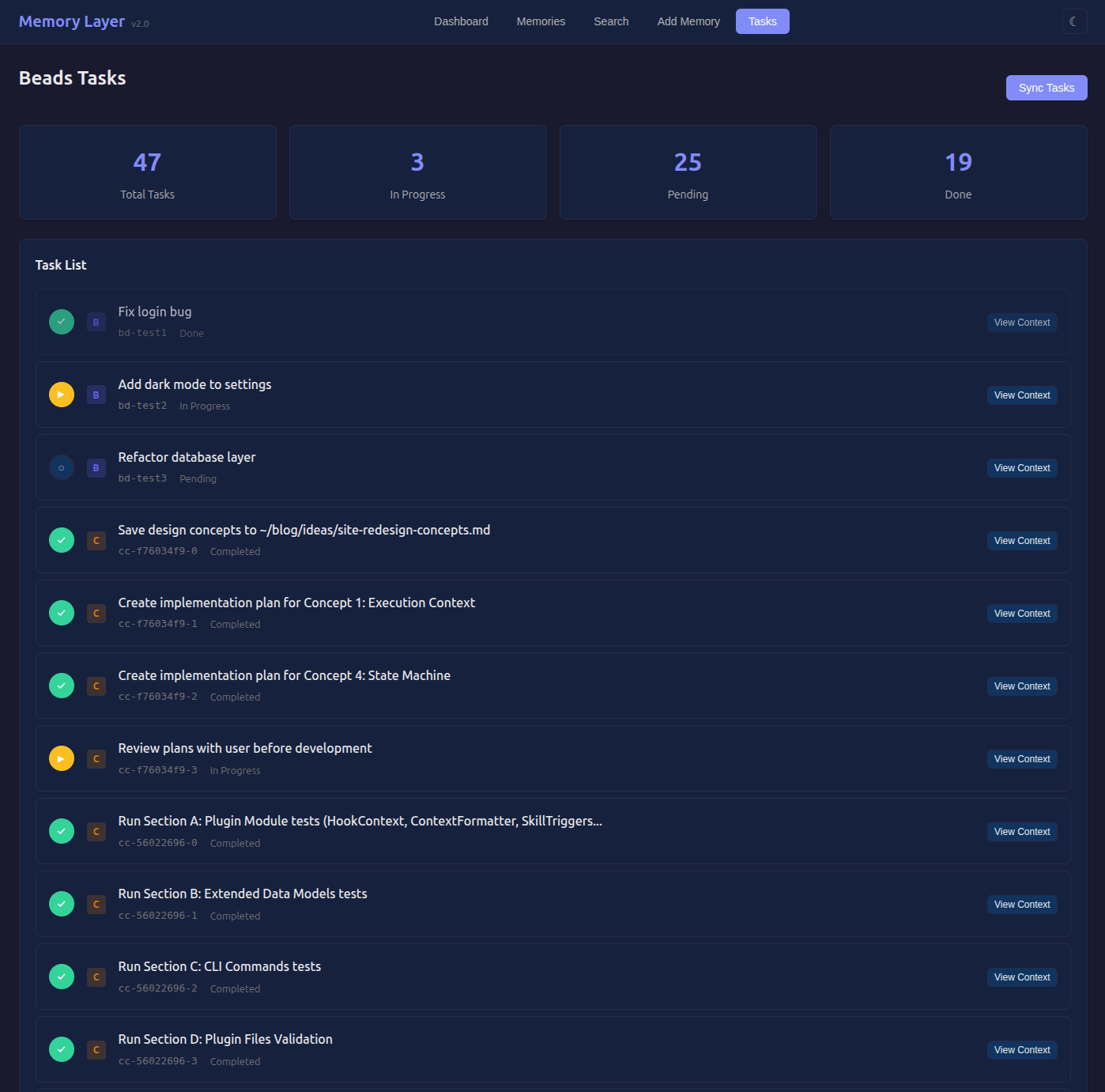
Beads and Claude Tasks solve different problems. Beads is repo-native and versioned - it’s great when tasks live with code. Claude Tasks is lightweight and works even when I’m exploring outside a repo. Supporting both keeps the task signal available in more situations and lets me validate that the feedback loop works independently of task tooling. The memory store stays the same either way.
Claude Tasks is newer and still evolving, so I want to treat it as an input source, not a dependency. If it changes, the adapter changes - the memory engine doesn’t.
Task Commands
mem tasks                          # List from all sources
mem tasks --source beads           # Just Beads
mem tasks --source claude          # Just Claude Code

mem tasks-sync                     # Sync outcomes for completed tasks
mem tasks-context --task cc-abc123 # Context for specific task
MCP for Agents
MCP (Model Context Protocol) is the standard that Cursor, Claude Desktop, OpenCode and Windsurf have adopted. Memory Layer exposes its tools via MCP so agents can call directly into the memory store.
Cursor
Add to ~/.cursor/mcp.json:
{
  "mcpServers": {
    "memory-layer": {
      "command": "mem",
      "args": ["serve", "--mcp"]
    }
  }
}
Restart Cursor. Memory Layer tools appear in the tool picker.
OpenCode / Windsurf
Same format. Add to ~/.opencode/config.json or ~/.windsurf/mcp.json.
Claude Code
Claude Code gets deeper integration via a plugin:
cd your-project
mem install-plugin
This creates:
- Hooks - Auto-load project context on session start
- Commands -
/remember,/recall,/outcome - Skills - Auto-activate based on conversation
Skills are the interesting part. When I ask “what did we decide about authentication?”, Claude automatically searches memories. When I mention “that worked!”, it prompts to record feedback. The agent becomes memory-aware without explicitly invoking commands.
REST for Automation
For CI/CD, scripts and tools that don’t speak MCP:
mem serve --rest --port 8080
This also serves the Web UI at localhost:8080.
# Search memories
curl -X POST "http://localhost:8080/memories/search" \
  -H "Content-Type: application/json" \
  -d '{"query": "authentication", "limit": 5}'
Other endpoints: POST /memories (add), POST /memories/outcome (feedback), GET /tasks (list tasks).
SDK and CLI
SDK - For embedding Memory Layer in custom tools:
from memory_layer.sdk import MemoryClient

async with MemoryClient() as client:
    results = await client.search("JWT expiry", limit=5)
    await client.record_outcome(results[0].memory.id, "worked")
Sync version available: SyncMemoryClient
CLI - The universal fallback:
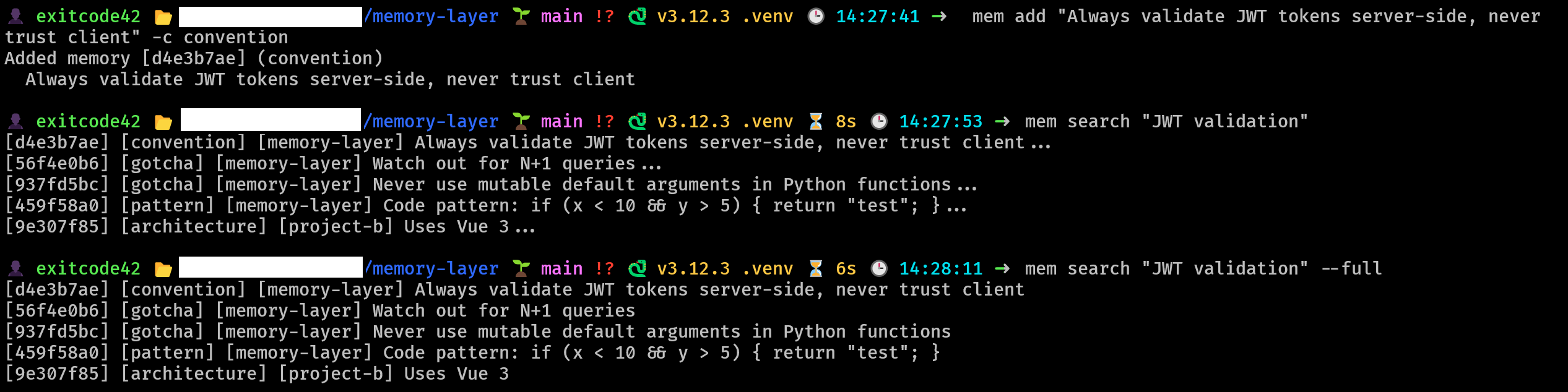
mem add "Always use async/await for I/O" -c convention
mem search "async"
mem outcome mem_abc123 worked
What Broke Along the Way
MCP stdio buffering - Python’s default stdout buffering causes MCP to hang. The spec doesn’t mention this. Fix: sys.stdout.reconfigure(line_buffering=True).
Hook execution order - SessionStart runs before the user prompt exists. I wanted to inject query-relevant memories, but the query doesn’t exist yet. Solution: inject broad project context at start, use skills for query-specific retrieval during conversation.
SQLite concurrent access - Cursor and Claude Code hitting the database simultaneously. Solution: WAL mode + retry with exponential backoff.
Security
Memory Layer is designed for local, single-user use.
- Local storage - Everything in
~/.memory-layer/. No external services. - No transmission - Memories stay on your machine.
- Localhost only - REST API binds to 127.0.0.1 by default.
For team use, put it behind an auth proxy.
What Makes It Different
The table below maps directly to the gap I described in Part 1.
| Memory Layer | claude-mem | Mem0 | CORE | |
|---|---|---|---|---|
| Install | pip install | pip install | Complex | Complex |
| Outcome learning | Yes | No | No | No |
| Task integration | Yes | No | No | No |
| Local-first | Yes | Yes | Partial | No |
| Multi-agent (MCP) | Yes | Partial | No | No |
Quick Start
# Install
pip install git+https://github.com/runtimenoteslabs/memory-layer.git

# Add a memory
mem add "Always use async/await for I/O" -c convention

# Search
mem search "async"

# Start Web UI + REST API
mem serve --rest --port 8080

# Or MCP server for Cursor/OpenCode
mem serve --mcp
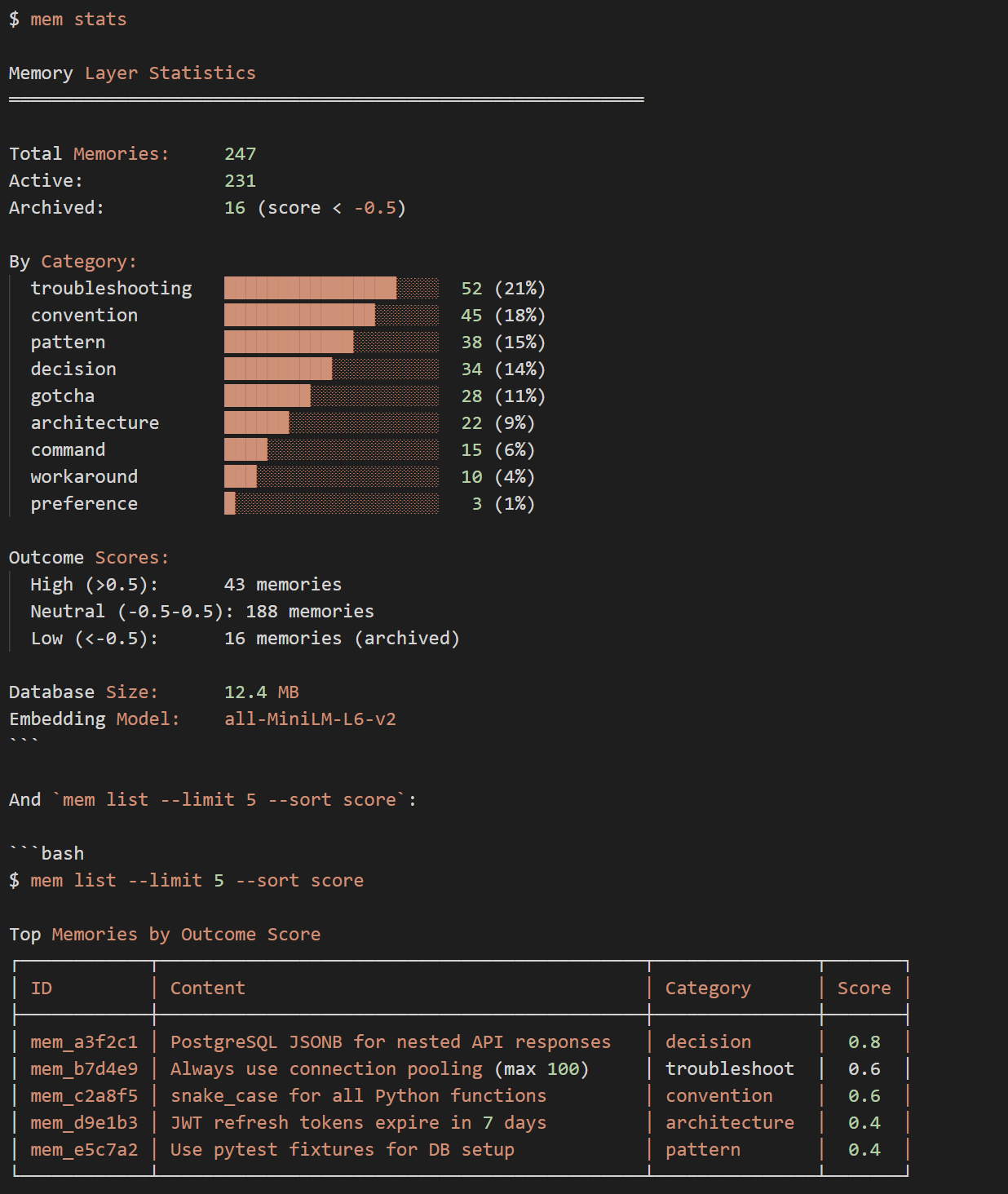
What’s Next
Memory Layer v2.1 is complete:
- Core engine with 5-signal hybrid retrieval
- MCP server for multi-agent access
- Claude Code plugin with hooks, commands and skills
- Unified task integration (Beads + Claude Code Tasks)
- Web UI at localhost:8080 REST API and Python SDK
Future directions:
- Reflection synthesis - “You’ve mentioned X five times - want to create a pattern for it?”
- Team features - Shared project memories. Onboarding acceleration.
The Bet
Most memory systems treat storage as the hard problem. I think retrieval quality is the real problem - quality comes from feedback.
The bet behind Memory Layer is that once memory is tied to task completion, the system starts curating itself. Good advice surfaces. Bad advice sinks. No manual pruning, no “rate this response” popups, no decay heuristics that throw out useful knowledge.
I’ve been running this for a few weeks now. The memories that help me most are the ones I added days ago and forgot about - they keep showing up because they keep working.
If you’re using multiple AI agents and tired of re-explaining the same context, try it:
pip install git+https://github.com/runtimenoteslabs/memory-layer.git
mem add "Your first convention" -c convention
One store. Every agent. Learns from what ships.
Series navigation:
- ← Overview: I spent 6 weeks building AI memory that learns
- ← Part 1: What I learned from 11 AI memory systems
- ← Part 2: Building memory that learns
Memory Layer is open source at github.com/runtimenoteslabs/memory-layer