Retrieving likes and bookmarks from x.com: a working guide
Contents13
Pulling your bookmarks and likes out of X takes far more than one API call. A working guide to the auth, pagination, archive parsing and rehydration.
I recently pulled about 4,000 of my own X bookmarks and likes into a local database.
The short version is: this is doable, but “just call the API” is misleading. The work is mostly in auth, pagination, missing fields, archive parsing, rehydration, deduplication, quota handling and knowing where the API simply does not give you the data you expect.
This guide is based on the importer I built and ran against my own saved posts. The request calls below are what I used in practice. Pricing, tier limits and endpoint access can change, so treat any cost or tier notes as implementation experience, not permanent truth. Check the current X developer portal before budgeting a large import.
All calls are X API v2, base https://api.x.com/2, bearer token in the Authorization header.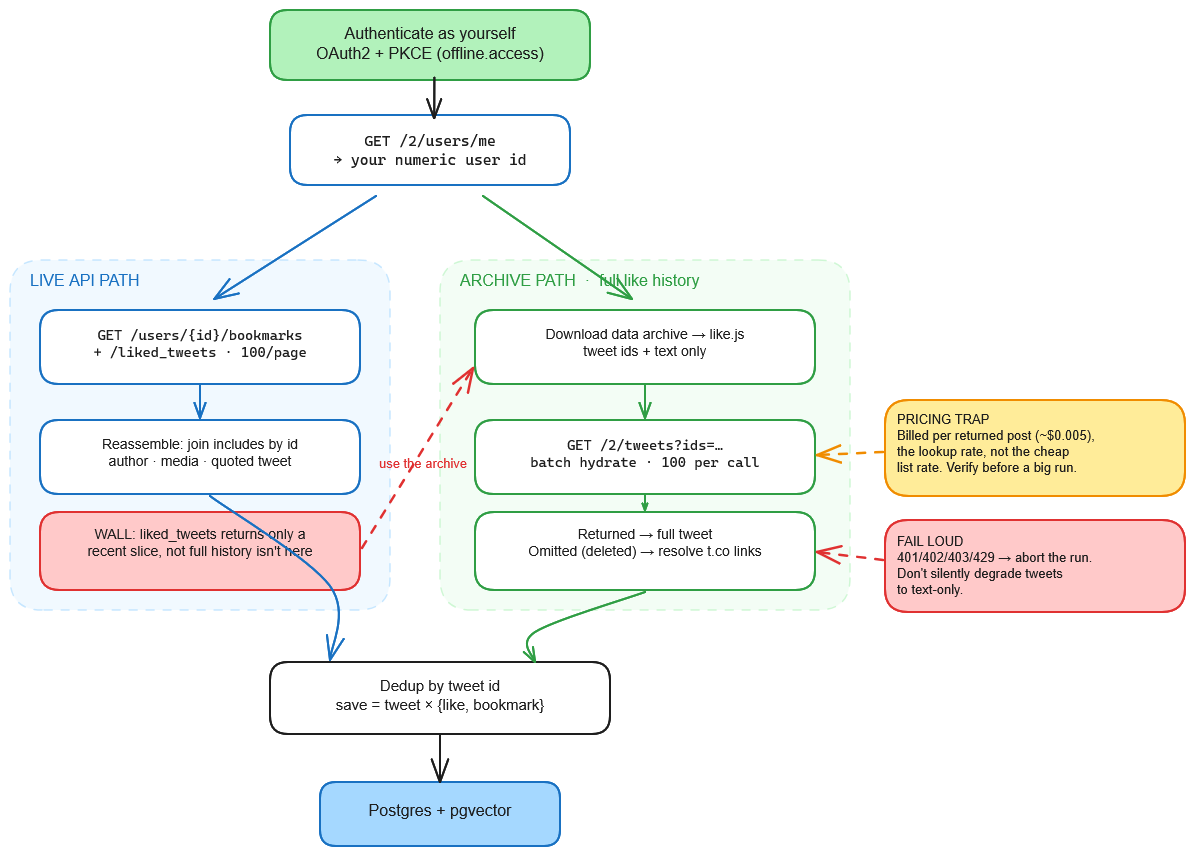
1. Use OAuth2 user context
Bookmarks and likes are user-scoped. You need a user access token through OAuth2 with PKCE, not an app-only bearer token.
The scopes I used were:
tweet.read
users.read
bookmark.read
like.read
offline.access
offline.access gives you a refresh token. Without it, your access token expires after a short period and your import will fail or need manual re-authentication.
Token and revoke endpoints:
POST https://api.x.com/2/oauth2/token
POST https://api.x.com/2/oauth2/revoke
2. Resolve your own user ID
Every bookmark/like call is keyed by numeric user id, not handle.
GET /2/users/me?user.fields=id,username
Store the returned id. You will need it for the next calls.
3. Fetch bookmarks and recent likes
The two main list endpoints are:
GET /2/users/{id}/bookmarks
GET /2/users/{id}/liked_tweets
Both paginate with max_results=100 (the cap) and a pagination_token from the previous page’s meta.next_token. The default response is too thin for a useful importer. The exact param set my sync sends on every page:
max_results=100

tweet.fields=id,text,note_tweet,author_id,created_at,entities,referenced_tweets,in_reply_to_user_id,conversation_id,attachments

expansions=author_id,attachments.media_keys,referenced_tweets.id,referenced_tweets.id.author_id

user.fields=id,username

media.fields=media_key,type,url,preview_image_url,variants,alt_text
3 of these are easy to miss and each one cost me a re-sync:
note_tweet. Without it,textis truncated at 280 characters for long posts and any link in the cut-off portion is silently lost. The full text and its entities live undernote_tweet.entities. Link extraction readsentities.urls[].expanded_url. Withoutentities, a saved post can degrade into plain text with no useful outbound URL.expansionsandincludes. The tweet object gives you IDs. The actual related objects arrive separately. For example:author_idmaps toincludes.usersattachments.media_keysmap toincludes.media- quoted or referenced tweets map to
includes.tweets
You need to join these back yourself. The API returns a normalized payload, not a fully assembled object.
4. Know the likes limitation
The likes endpoint does not necessarily return your full historical like history.
In practice, liked_tweets gives you a recent slice. If you have liked posts over many years, older likes may not be reachable by paginating the API endpoint.
Bookmarks paginated further back for me, but likes were the harder limit.
So the right mental model is:
API likes endpoint = recent reachable likes
X data archive = fuller like history
Do not design your importer assuming the likes endpoint gives you everything.
5. Use the X data archive for older likes
For the fuller like history, request your official X data archive from settings.
Inside the archive, likes are stored in:
data/like.js
This file is not clean JSON. It is a JavaScript assignment:
window.YTD.like.part0 = [
  {
    "like": {
      "tweetId": "...",
      "fullText": "...",
      "expandedUrl": "https://twitter.com/i/web/status/..."
    }
  }
]
To parse it:
- Strip the prefix:
window.YTD.like.part0 =
- Parse the remaining content as a JSON array.
Each archive record gives you a tweet ID, text and a permalink. It does not give you the full API-level object: no author object, no created date, no media metadata and no reliable external link entities.
The archive is good for discovery. You still need rehydration for a proper database.
6. Rehydrate archive tweets by ID
To turn archive tweet IDs into proper tweet objects, batch lookup tweets:
GET /2/tweets?ids={comma_separated_ids}
Use up to 100 IDs per call.
Use the same tweet.fields, expansions, user.fields and media.fields listed earlier.
Important behavior:
Missing tweets are silently omitted
If a tweet is deleted, protected or from an unavailable account, it may simply not appear in the response.
Do not assume the response length equals the request length.
Diff the IDs you requested against the IDs you got back:
requested_ids - returned_ids
Treat missing IDs as unavailable.
Keep archive fallback text
For tweets that cannot be rehydrated, the archive fullText may be all you have.
For these records, I keep the archive text and try to recover useful URLs by resolving any t.co links. The fallback is not as rich as an API result, but it is better than dropping the save entirely.
7. Watch the pricing model
This is one of the easiest places to mis-budget.
The docs frame reading your own data as cheap. In practice the lookup endpoint bills per resource it returns, and the cheaper “owned-read” rate only applies to the user-scoped list endpoints, not to lookup-by-id. Re-hydrating an archive is thousands of by-id lookups, so it lands on the standard per-post read rate.
When I built this, I budgeted around:
returned tweets × $0.005
The important point is not the exact number. The important point is the shape of the cost:
list reads and lookup-by-ID reads may not be priced the same
Also, unavailable tweets are not returned, so they should not be counted as returned resources.
Before a large run, verify the live pricing and access tier in the X developer portal.
8. Deduplicate by tweet ID
If you import both bookmarks and likes, the same tweet can appear more than once.
A tweet can also appear repeatedly across pagination or across sources.
Use tweet ID as the canonical key.
Model the save separately:
tweet
tweet_save_source
For example:
tweet_id = 123
sources = bookmark, like
Do not deduplicate by URL. Different tweets can point to the same URL, and the same tweet can have multiple URLs. The tweet is the stable unit.
9. Fail loudly on auth, quota and access errors
For lookup and import paths, handle these as hard failures:
401 invalid or expired token
402 payment required / credits exhausted
403 missing scope, missing access or wrong tier
429 rate limited
Do not swallow these errors and continue.
The reason is specific. If credits run out mid-import and you swallow the error, you silently downgrade thousands of tweets to text-only and end up with a run that looks successful and is actually half empty.
A better approach:
fail the run
log the failed stage
fix the token / tier / quota / rate limit
rerun from the last safe checkpoint
10. Threads require separate handling
Reconstructing a thread means fetching every tweet sharing a conversation_id:
GET /2/tweets/search/recent?query=conversation_id:{id}
This has two practical limitations:
- It may require a higher access tier.
- Recent search only covers a limited recent window.
That means thread reconstruction works best for recent saves. For older saves, you may not be able to rebuild the full thread through the API.
I treat thread hydration as optional enrichment. If it fails with access or tier errors, I keep the saved tweet and continue without the thread.
11. Some X content is not fully described by the API
Not every saved item can be cleanly represented through the documented v2 API.
For example, X-native articles or long-form posts may not expose all the metadata you would expect through the endpoints used above. Getting those readable took a workaround outside the API that sits in a gray area, so I am leaving it out here. Do not assume the API can fully describe every kind of save.
Recommended import flow
A reliable import flow looks like this:
1. Authenticate with OAuth2 user context
2. Resolve your numeric user ID
3. Page through reachable bookmarks
4. Page through reachable recent likes
5. Download and parse the X data archive
6. Extract historical like tweet IDs
7. Rehydrate archive tweet IDs in batches of 100
8. Join users, media and referenced tweets from includes
9. Resolve fallback URLs for archive-only records
10. Deduplicate by tweet ID
11. Store save source separately from tweet object
12. Fail loudly on auth, quota, tier and rate-limit errors
Final takeaway
Getting your own data out of X is absolutely doable. It is just much more than one API call and most of the friction is by design.
 Related projectCairn · alpha→